


Threaded messages - is this what I've suddenly got and how to get rid of it?
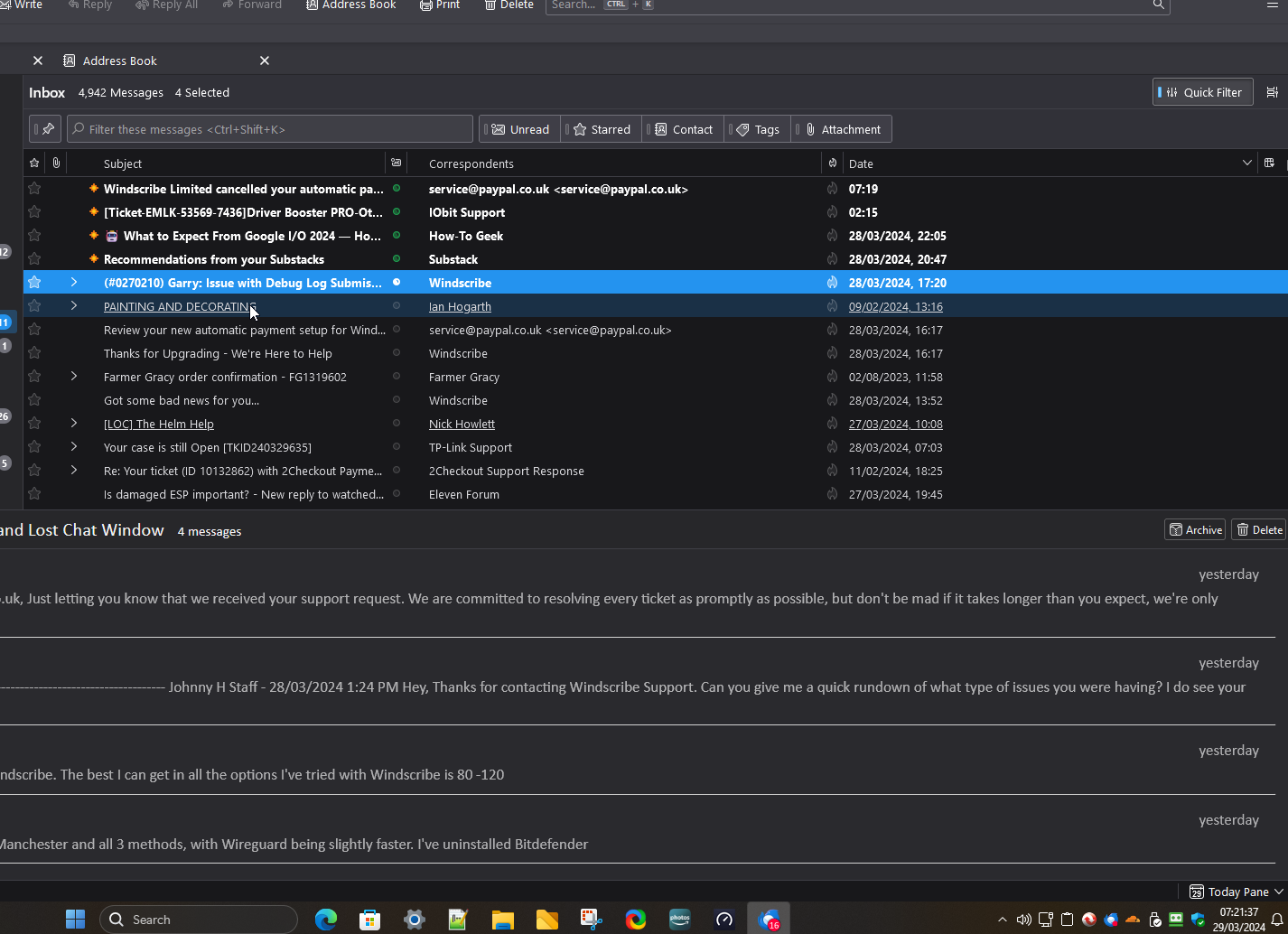
Is the first photo showing threaded messages? If so, how do I get rid of them? Other posts say "Select Folder, then View, then unthread". The only View I can find is in Menu/View. but it only shows Toolbars, Layout and Folders
すべての返信 (2)
to get to the point of asking a question you must have typed into the support site something
I tried it with "Threaded messages" https://support.mozilla.org/en-US/questions/new/thunderbird#search
The first result returned was https://support.mozilla.org/en-US/kb/message-threading-thunderbird
the article answers all your questions about what it is and how to control it.
選ばれた解決策
Yes I did, thanks and got the same article. As I said in my post, I can't find the options given in it as below, hence my post
"Click the appmenu button ≡ and select the View menu (or, press the Alt key to make the classic menu bar appear and open the View menu). In the Sort by submenu, choose Threaded."
The only View button I can find shows "Toolbars, Layout and Folders"
Going back to my first question - is this, in fact, threading or something else (no tree structure, just a list)?
Have now sorted both by showing the Menu Bar and choosing View/Sort by/Unthreaded
この投稿は Tombarkas により に変更されました