


Two Junk And Trash Folders Displayed (GMail) after upgrading to Thunderbird 115

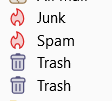
After upgrading to Thunderbird 115, 2 spam folders (1 labelled Junk and the other Spam) and 2 Trash folders are displayed in my private GMail account.
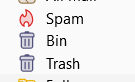
In my Google Workspace account, 2 Trash folders (1 Bin and 1 Trash) are displayed.
Kindly advise how to fix.
すべての返信 (1)
I have something fairly similar in V102. A junk and a Spam folder. The cause is fairly simple, so is the cure.
Thunderbird defaults to using a junk and a trash folder. Google use a Spam and a bin (apparently) folder.
When the account is initially created the IMAP mail server is supposed to offer folders with their special flag and Thunderbird is supposed to honor that, but as you see that is not always what happens.
Go to the account setting for the account and in server settings make sure the folder trash is moved to is the bin folder.
Then move to the junk settings and again change the folder to the one google chooses (spam)
Follow that with restarting Thunderbird. This "should" reset you to have the folders, but only one of them having the special icon. Once the folder is "just a folder" you can delete it.
IF the restart does not change the icon, you can force the issue using this addon. https://addons.thunderbird.net/thunderbird/addon/folderflags/ I do not recommend changing it in a forced manner if any of your account setting are still pointing to it as special as that is just mess things up in a big way.
Note if you do not want to have the [gmail] sub folder you can add to the server settings advanced dialog that the imapo server directory is [gmail]. That places all the folders one after the other instead of having some of them in a sub folder.