


Is it possible to permanently set a different search engine for Private Browsing?
Is it possible to permanently set a different search engine for private browsing? I have Google set as my search engine in my normal browsing mode, but I'd like the private browser search engine to be permanently set to DuckDuckGo.
(I realise I can manually set it each time to DuckDuckGo but this is tedious.)
With thanks.
すべての返信 (2)
選ばれた解決策
Yes! But it's a little tricky to turn on. Here's how:
(1) In a new tab, type or paste about:config in the address bar and press Enter/Return. Click the button accepting the risk.
More info on about:config: Configuration Editor for Firefox. The moderators would like us to remind you that changes made through this back door aren't fully supported and aren't guaranteed to continue working in the future. This feature is subject to improvement and bug fixes before being generally enabled.
(2) In the search box in the page, type or paste browser.search.separatePrivateDefault.ui.enabled and pause while the list is filtered
(3) Double-click the preference (or click the toggle switch toward the right end of the row) to switch the value from false to true
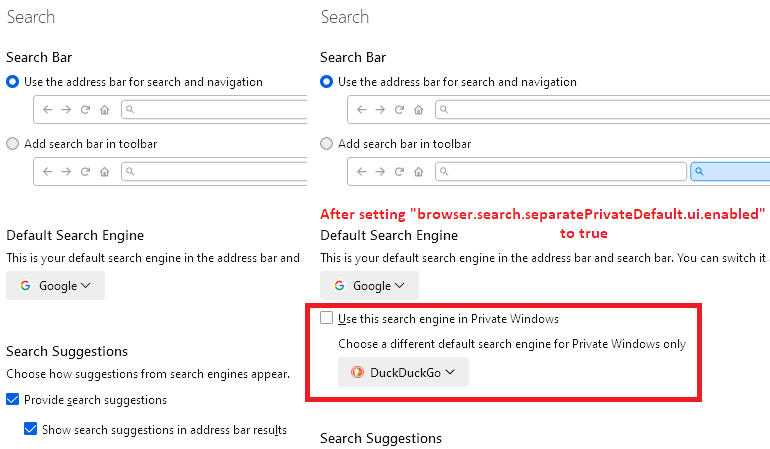
Now, a new section should appear on the Settings page:
Does it work on your Firefox?
Wonderful, thanks. That solved the problem perfectly.
Thanks.