


How to force Firefox to make antialiasing of some fonts?

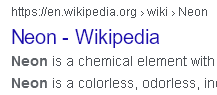
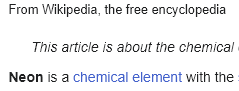
In windows 10 I have disabled ClearType antialiasing. Because of this, Firefox does not make antialiasing of some fonts: Firefox-Google Firefox-Wiki
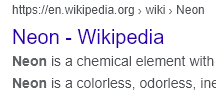
On the same system, Chrome browser does antialiasing (grayscale): Chrome-google Chrome-wiki
How to force the Firefox to use antialiasing the same way as Chrome?
Firefox is 113.0.2
In windows 10 I have disabled ClearType antialiasing. Because of this, Firefox does not make antialiasing of some fonts:
[https://assets-prod.sumo.prod.webservices.mozgcp.net/media/uploads/images/2023-05-29-13-59-08-d373e7.png Firefox-Google ]
[https://assets-prod.sumo.prod.webservices.mozgcp.net/media/uploads/images/2023-05-29-14-00-19-74a819.png Firefox-Wiki ]
On the same system, Chrome browser does antialiasing (grayscale):
[https://assets-prod.sumo.prod.webservices.mozgcp.net/media/uploads/images/2023-05-29-14-01-35-393615.png Chrome-google]
[https://assets-prod.sumo.prod.webservices.mozgcp.net/media/uploads/images/2023-05-29-14-01-43-7a7771.png Chrome-wiki]
How to force the Firefox to use antialiasing the same way as Chrome?
Firefox is 113.0.2

この投稿は bflmpsvz により に変更されました