Windows 10 reached EOS (end of support) on October 14, 2025. If you are on Windows 10, see this article.

Mozilla サポートの検索

サポート詐欺に注意してください。 私たちはあなたに通話やショートメッセージの送信、個人情報の共有を求めることはありません。疑わしい行為を見つけたら「迷惑行為を報告」からご報告ください。

詳しく学ぶ

このスレッドはアーカイブに保管されました。 必要であれば新たに質問してください。

Thunderbird occasionally stops showing folders

  • 1 件の返信
  • 0 人がこの問題に困っています
  • 214 回表示
  • 最後の返信者: madanra

I access my email via IMAP. The IMAP server runs Dovecot.

Occasionally, Thunderbird stops showing some of my folders. The folders are still shown in the subscriptions settings, and are still subscribed to, but are not showing in the folder pane. Often, unsubscribing, restarting Thunderbird, resubscribing, and restarting Thunderbird works, and the folders reappear, but sometimes that is insufficient. As has happened today.

The folder Peverel Road and all its subfolders disappeared; unsubscribing and resubscribing brought back the Peverel Road folder, but not its subfolders.

View -> Folders is set to All.

Advanced account settings is set to *not* "Show only subscribed folders".

I access my email via IMAP. The IMAP server runs Dovecot. Occasionally, Thunderbird stops showing some of my folders. The folders are still shown in the subscriptions settings, and are still subscribed to, but are not showing in the folder pane. Often, unsubscribing, restarting Thunderbird, resubscribing, and restarting Thunderbird works, and the folders reappear, but sometimes that is insufficient. As has happened today. The folder Peverel Road and all its subfolders disappeared; unsubscribing and resubscribing brought back the Peverel Road folder, but not its subfolders. View -> Folders is set to All. Advanced account settings is set to *not* "Show only subscribed folders".
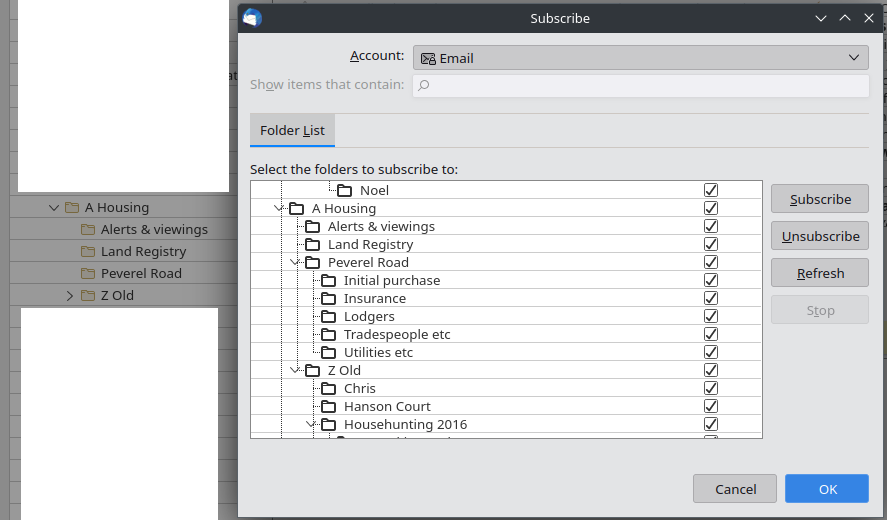
添付されたスクリーンショット

すべての返信 (1)

Enabling "Show only subscribed folders" & restarting Thunderbird made the folders reappear this time. I then disabled it again and restarted Thunderbird, and the folders have remained.

Well, I now have one more tool in my toolbox for next time this happens...