


delivert status notification

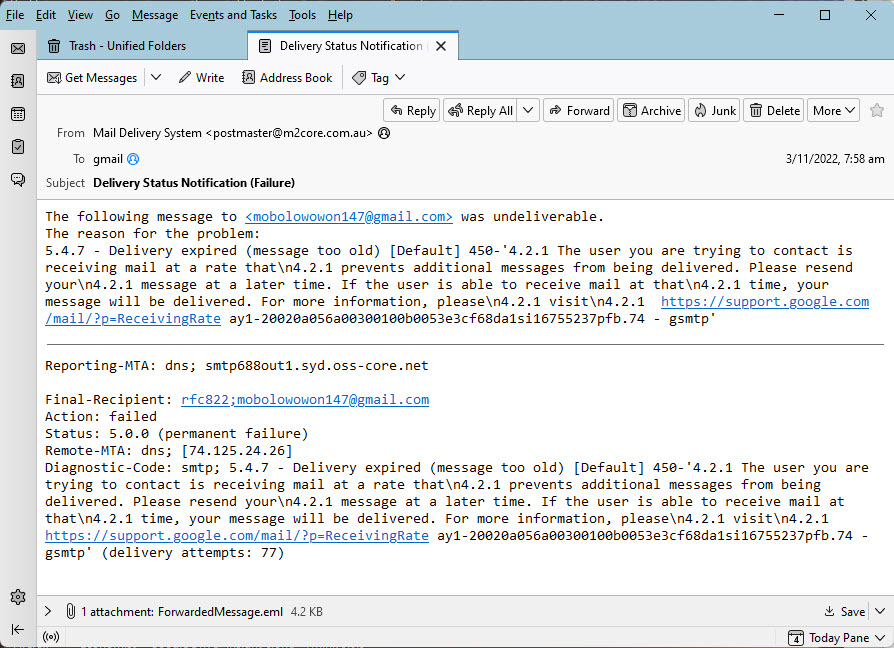
An address mobolowowon147@gmail.com has hidden itself in my address book. I have checked all the lists and the name is not there. I constant receive the delivery status email but that notification doesn't give me the subject of the rejected email so I can't investigate the addressee(s)
Suggestions
すべての返信 (4)

Hello
did you try to click on 'forwarded message' at the bottom of the window ?
Clicking on the forwardmessage.eml gives me a blank screen.
Double click the EML file and when the "blank screen" opens press Ctrl+U What do you see now? That is the text based source of the email. All emails, even blank ones, have headers.
Still empty. However, I went back to the Google Gmail which shows the whole chain. It appears that this weird email address tags itself to three (the ones I have found so far) groups. I will delete and then recreate each group. This might do the job. Still leaves the question of how the email address has attached itself and can't be detected