


Thunderbird error message

I set up Thunderbird on my new desktop and downloaded a bunch of messages. The last message is from Feb 8 - the day I set Thunderbird up on my new desktop (so it worked at first). When I recently checked, I found this error message:
"An error occurred with the POP3 mail server. Mail server secure267.inmotionhosting.com responded: "
However, I THOUGHT I was using IMAP. I've checked the server settings and they work on my Android phone.
Please advise what I'm doing "rong."
And thanx for volunteering to help!
==Jeff Wynn
選ばれた解決策
The Server Type is POP, but you have it connecting through the IMAP port 993. If you have any mail in the POP account to save, copy it to subfolders of Local Folders, then select the account in the left pane of Account Settings, then Account Actions, Remove Account, then Account Actions, Add Mail Account, and select IMAP in the setup wizard. Click Manual config. if the settings aren't detected.
http://kb.mozillazine.org/Convert_a_POP_account_to_a_IMAP_account
すべての返信 (5)
Please post your settings so we can give feedback. You would need to use port 993 to use IMAP and have mutual access with phone, which also would need 993 for port.
この投稿は david により に変更されました
Thanx for the quick reply.
Yes, I am using port 993. However, I just noticed that it says "Server Type: POP Mail Server"
How do I change this to IMAP? Could that be the problem?
==Jeff
It could be. Please post the full server setting info so we can confirm. Look at wording in tools>account settings>server settings. The top line specifies type of server, IMAP or POP. If it says POP and you meant IMAP, then you need to remove that account and set up a new one. That is, you cannot change one to the other.
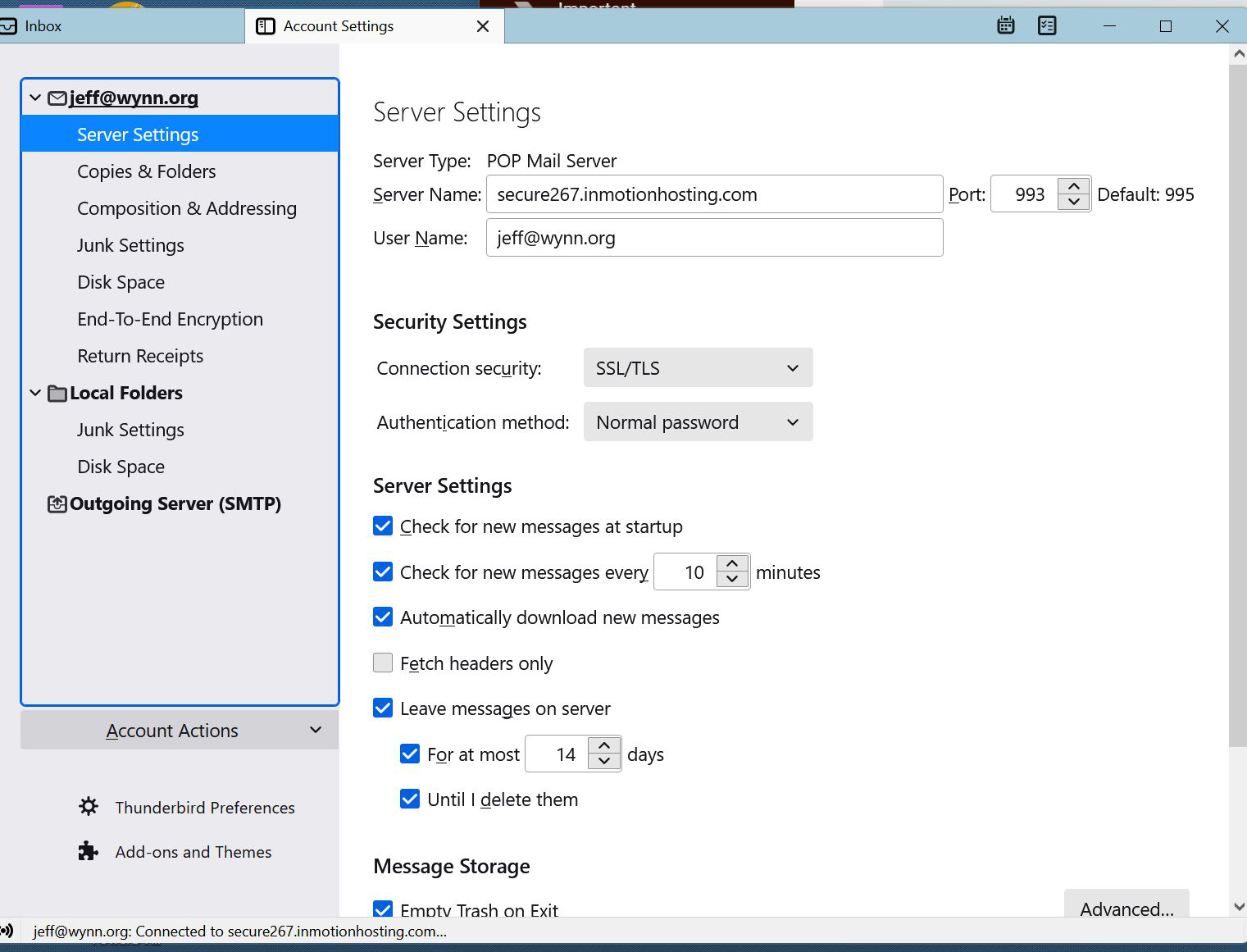
Here are my current server settings. I hope the JPG makes it this time - last time it would never stop loading.
How do I cleanly delete the POP setup?
Plz remind me how to set up an IMAP correctly this time. Thanx again for the quick response.
==Jeff
選ばれた解決策
The Server Type is POP, but you have it connecting through the IMAP port 993. If you have any mail in the POP account to save, copy it to subfolders of Local Folders, then select the account in the left pane of Account Settings, then Account Actions, Remove Account, then Account Actions, Add Mail Account, and select IMAP in the setup wizard. Click Manual config. if the settings aren't detected.
http://kb.mozillazine.org/Convert_a_POP_account_to_a_IMAP_account