


Posting pics
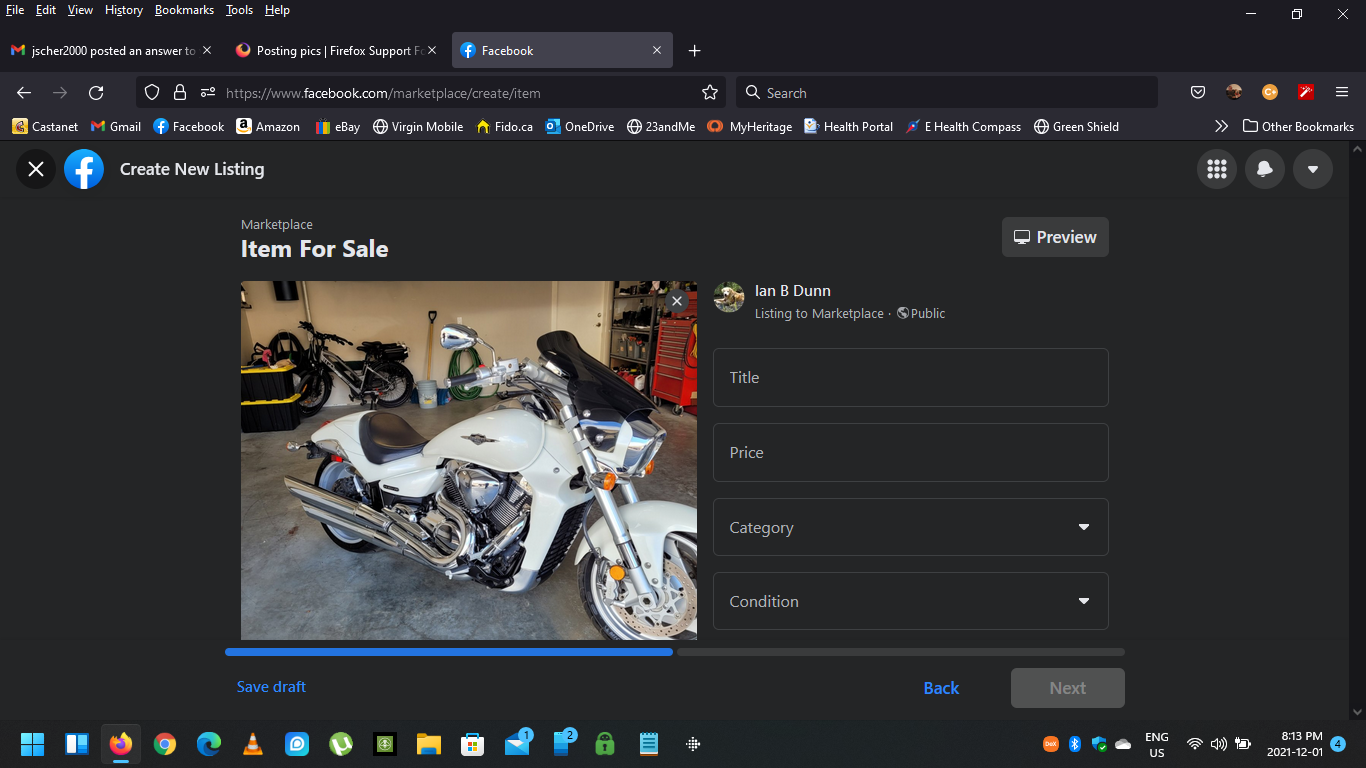
When I try to post a pic on Marketplace in Firefox I select the .JPG picture and upload it. The picture I want to post appears fine before I upload it. Once I upload it to Facebook, it just appears as a solid colour. I have attached a couple pics, one is of the pic I want to upload and the other is the pic after it is uploaded. I should state that if I use Chrome or Edge, it works fine. And if I try to post a pic to my timeline it works fine. I just have this problem when using FireFox and trying to post to MarketPlace I know, well just use Chrome or Edge, I DON'T WANT TO :-) I want to use my FireFox. Ian


選ばれた解決策
Do you see that third icon before the URL* in your screenshot? That is the canvas extract permission related to resistFingerprinting. Use that icon to give FB permission to do the image extraction and then try the upload again. I think that is the simplest workaround for now.
* The URL in the address bar. After the shield and lock icons.
この投稿は jscher2000 - Support Volunteer により に変更されました
すべての返信 (5)
Do you have enabled "Resist Fingerprinting" and have set this pref to true on the about:config page ?
- privacy.resistFingerprinting => false
- https://support.mozilla.org/en-US/kb/firefox-protection-against-fingerprinting
Yes I do

選ばれた解決策
Do you see that third icon before the URL* in your screenshot? That is the canvas extract permission related to resistFingerprinting. Use that icon to give FB permission to do the image extraction and then try the upload again. I think that is the simplest workaround for now.
* The URL in the address bar. After the shield and lock icons.
この投稿は jscher2000 - Support Volunteer により に変更されました
Thanks jscher2000 That seems to have worked, any idea why this happened in the first place? Ian
resistFingerprinting modifies canvas extracts to prevent them from being used for fingerprinting.