


Thunderbird mail

Hello,
In Mozilla Thunderbird mail how can I add logo and text together in signature I have checked the signature option but I can only add text, not a logo. I hope you will help me.
すべての返信 (3)
You need to create a signature html files and then set settings to use it.
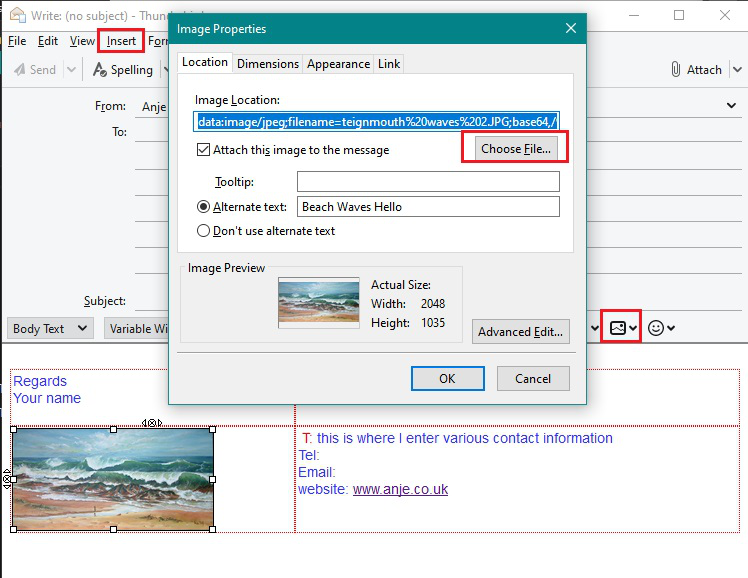
In Thunderbird opena new Write message and completely clear any contents or signatures. Leave a blank line - just trust me on this, it really does help. Create your signature just like typing an email - you are using Thunderbird to create all the html code. Add image as if adding an inline image. If you need to control positioning then use a Table.
Then save as a File Choose where to save eg: I created a 'Signature' folder in 'my documents' so I can keep all the various signature html files and any images I use in signature. SAve as html file type.
In Account Settings for that account select the 'Attach the signature from a file instead' option. click on 'Choose' and select that signature html file which you previously saved.
This link may help: https://support.mozilla.org/en-US/kb/signatures#w_signatures-stored-in-files
I've also added some images that may help.


Hello Toad-Hall,
Thank you so much! It's working but how to reduce space between lines in a signature.
Regards, Abhijeet
This question has been locked because the original author has deleted their account. While you can no longer post new replies, the existing content remains available for reference.