


Broken window layout on when opening browser in Ubuntu Linux (KDE)

Hello.
I got a little problem with firefox starting with somewhat broken window layout on my Ubuntu 20.04 desktop with KDE desktop environment. Tried to google for it unsuccessfully, so here I am. Whenever I start firefox after cold boot or a full reboot, it runs like on a screenshot. The workaround for fixing that is to resize window and then make it maximized again. I am not quite sure, is it a problem of browser, video driver, or desktop environment, but it occurs for me only on firefox.
- Appeared several versions ago, present on current version I use: 89.0.2 (64-bit)
- Does not appear when i load windows 10 on this PC.
- Video card: Nvidia 1660S driver ver.460
Does anyone heard of that problem? Would be glad to know any details to address this problem.
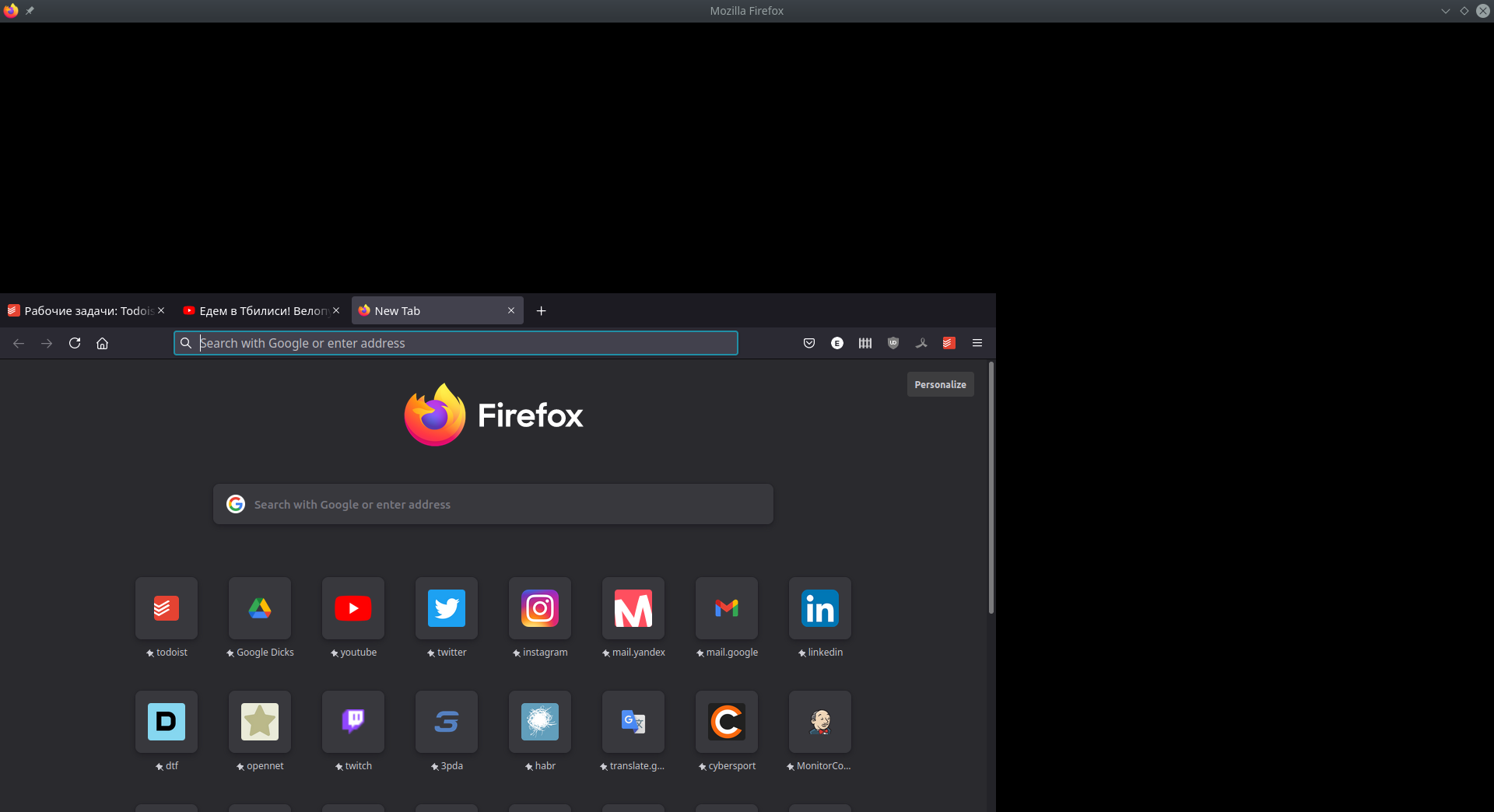
選ばれた解決策
How about using OBS to create a video showing the issue? Have you tried downloading a separate copy to a folder and run it from there to see if you have the same issue?
https://www.mozilla.org/en-US/firefox/all/#product-desktop-release
Operating System: openSUSE Tumbleweed 20210714 KDE Plasma Version: 5.22.3 KDE Frameworks Version: 5.83.0 Qt Version: 5.15.2 Kernel Version: 5.13.1-1-default (64-bit) Graphics Platform: X11 Processors: 8 × Intel® Core™ i7-4810MQ CPU @ 2.80GHz Memory: 31.0 GiB of RAM Graphics Processor: Mesa DRI Intel® HD Graphics 4600
この回答をすべて読む 👍 0すべての返信 (1)
選ばれた解決策
How about using OBS to create a video showing the issue? Have you tried downloading a separate copy to a folder and run it from there to see if you have the same issue?
https://www.mozilla.org/en-US/firefox/all/#product-desktop-release
Operating System: openSUSE Tumbleweed 20210714 KDE Plasma Version: 5.22.3 KDE Frameworks Version: 5.83.0 Qt Version: 5.15.2 Kernel Version: 5.13.1-1-default (64-bit) Graphics Platform: X11 Processors: 8 × Intel® Core™ i7-4810MQ CPU @ 2.80GHz Memory: 31.0 GiB of RAM Graphics Processor: Mesa DRI Intel® HD Graphics 4600