

このスレッドはアーカイブに保管されました。
必要であれば新たに質問してください。

Solved
アーカイブに保管済み
Need Speech to Text Capability in Firefox for iOS
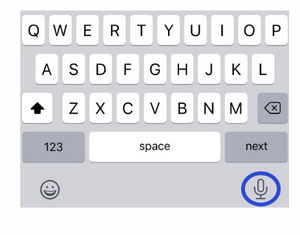
Firefox is my default browser on iPhone 11 Pro. I use an education app that has a Speech to Text feature to dictate student observations. In a Safari browser this feature is readily accessed by a microphone symbol on the keyboard that comes up in a text window. In Firefox I cannot access the microphone for speech to text. I don't want to go back to Safari as my default browser. Is there a workaround? The image is of the Safari screen in this app. Can Firefox enable a similar access using an icon for the microphone?
Firefox is my default browser on iPhone 11 Pro. I use an education app that has a Speech to Text feature to dictate student observations. In a Safari browser this feature is readily accessed by a microphone symbol on the keyboard that comes up in a text window. In Firefox I cannot access the microphone for speech to text. I don't want to go back to Safari as my default browser. Is there a workaround? The image is of the Safari screen in this app. Can Firefox enable a similar access using an icon for the microphone?
すべての返信 (1)
選ばれた解決策
Check keyboard settings in Settings app. Speech to text option should be beside space button.