


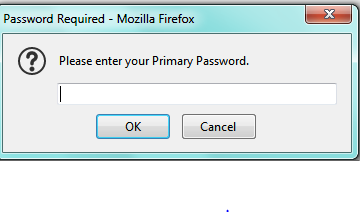
Password Required - Mozilla Firefox pop up
When I open my Yahoo browser I get a pop up asking for my "Primary password". I checked in the Task Manager and it is present as Firefox that when I end that task then the popup goes away. I am already signed in to my Firefox Acct. I screenshot the popup below. It will return several time even if I "X" out or hit cancel. There is no other information no matter where I click on that box. I do not put any passwords in the box for fear of scam/virus/spoof ETC.
すべての返信 (1)
I would avoid that because you are correct, it looks suspicious. Under preferences, there is a way to set your primary password which looks nothing like that dialog box. This link https://support.mozilla.org/en-US/kb/use-primary-password-protect-stored-logins walks you through that process. Try to set your primary password that way and see if that still pops up. If it does I would download and turn on add block to minimize the number of pop-ups.