


Windows 10 reached EOS (end of support) on October 14, 2025. If you are on Windows 10, see this article.

Mozilla サポートの検索

サポート詐欺に注意してください。 私たちはあなたに通話やショートメッセージの送信、個人情報の共有を求めることはありません。疑わしい行為を見つけたら「迷惑行為を報告」からご報告ください。

詳しく学ぶ
このスレッドはアーカイブに保管されました。 必要であれば新たに質問してください。
Solved アーカイブに保管済み

"Download failed" keeps popping up

BryanS

Yesterday I tried downloading a document but it failed to do so. Since then, the 'Download failed' message keeps popping up as a warning in Android. I can't acknowledge it by clicking on the message, but I can swipe it away until it comes back within about 2-30 minutes. The message seems to appear only when Firefox is not running in the foreground. There are no tabs open and this download is not available in the Downloads list. I can't clear the downloads list by the way, which is weird.

I already forced a shutdown of the app and cleared the cache. I haven't tried to clear all data as I don't want to set up the app all over again. I'm sure that works but that's not the solution for this.


Bryan
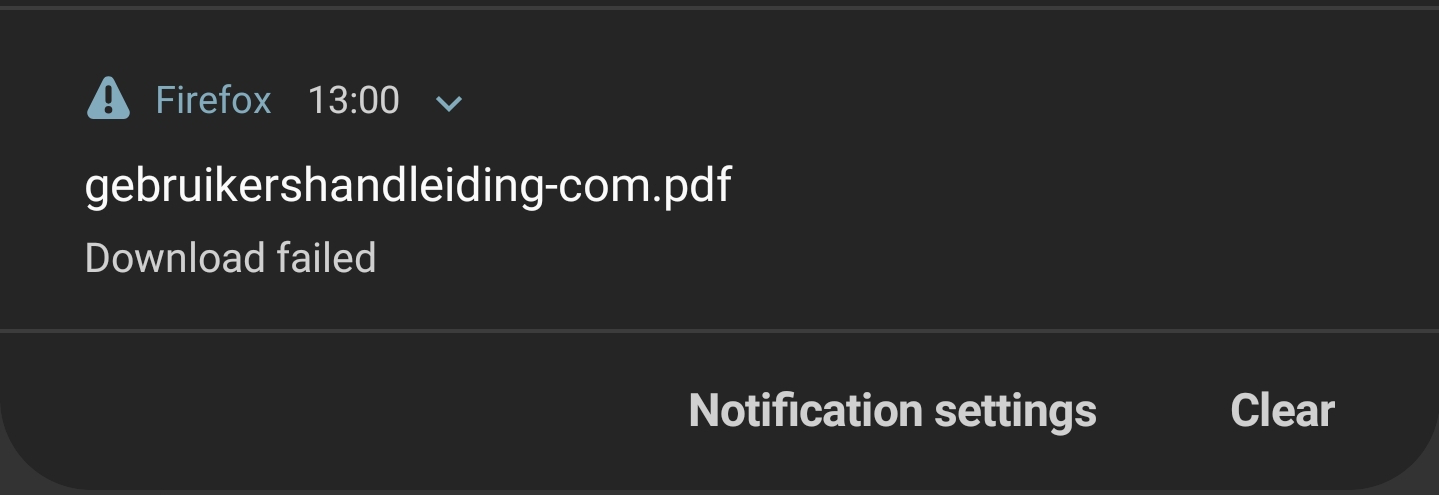
Yesterday I tried downloading a document but it failed to do so. Since then, the 'Download failed' message keeps popping up as a warning in Android. I can't acknowledge it by clicking on the message, but I can swipe it away until it comes back within about 2-30 minutes. The message seems to appear only when Firefox is not running in the foreground. There are no tabs open and this download is not available in the Downloads list. I can't clear the downloads list by the way, which is weird. I already forced a shutdown of the app and cleared the cache. I haven't tried to clear all data as I don't want to set up the app all over again. I'm sure that works but that's not the solution for this. Bryan
添付されたスクリーンショット

すべての返信 (1)

選ばれた解決策

Ah, there is a cancel button under the tiny blue arrow. I would suggest to show all downloads in the downloads-window, together with a cancel and remove button. Thanks!