


Event Invite Time Shown is off by One Hour
I have found that email invites for events scheduled in South Africa (GMT+2) display the the incorrect time on my system which is set to US Eastern Time.
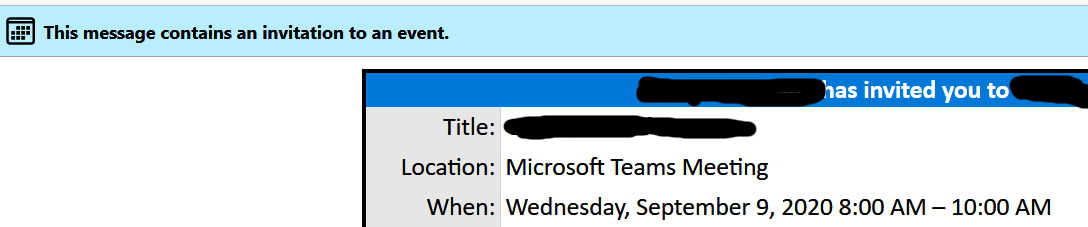
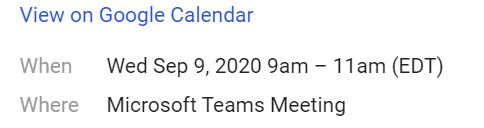
For example, an MS Teams meeting invite for a South Africa time 3:00pm-5:00pm, incorrectly shows as 8:00am - 10:00am. If I open that same email in Gmail, it correctly shows as 9:00am - 11:00am. (Screenshots included)
My Windows 10 date and time settings are set to auto (time and timezone) and all seems to be correct -> ie showing the correct time and indicating UTC-5:00 Eastern with DST On.
The following is that start of the invite.ics file: BEGIN:VCALENDAR METHOD:REQUEST PRODID:Microsoft Exchange Server 2010 VERSION:2.0 BEGIN:VTIMEZONE TZID:South Africa Standard Time BEGIN:STANDARD DTSTART:16010101T000000 TZOFFSETFROM:+0200 TZOFFSETTO:+0200 END:STANDARD BEGIN:DAYLIGHT DTSTART:16010101T000000 TZOFFSETFROM:+0200 TZOFFSETTO:+0200 END:DAYLIGHT END:VTIMEZONE BEGIN:VEVENT
.... other stuff, then
RECURRENCE-ID;TZID=South Africa Standard Time:20200910T150000 SUMMARY;LANGUAGE=en-US:Meeting Invitation DTSTART;TZID=South Africa Standard Time:20200909T150000 DTEND;TZID=South Africa Standard Time:20200909T170000
Any suggestions on what is causing Thunderbird to show the incorrect time? ... first guess is that it is something to do with DST, but have no idea how to test and/or correct it?
Thanks, Mark
この投稿は mark223 により に変更されました
選ばれた解決策
check the timezone settings in Options > calendar. For reasons that escape me the calendar does not necessarily use the system timezone.
この回答をすべて読む 👍 1すべての返信 (3)
選ばれた解決策
check the timezone settings in Options > calendar. For reasons that escape me the calendar does not necessarily use the system timezone.
Strange, I hadn't even looked at calendar settings as I wasn't using & hadn't setup calendars and didn't think it was relevant, but clearly that is the setting that was in use for interpreting invites. My calendar was incorrectly set to Chicago.... very strange, definitely an area for some improvement.
the ability to do anything with an ICS attachment other than display it as an attachment ala word doc files is a calendar function.
I strongly suggest you implement a caldav calendar linked to your existing online calendar so you can actually process the invites rather than just look at them.