


Bug or Feature: colors are off for CMYK-Jpegs compared to Chrome and Edge
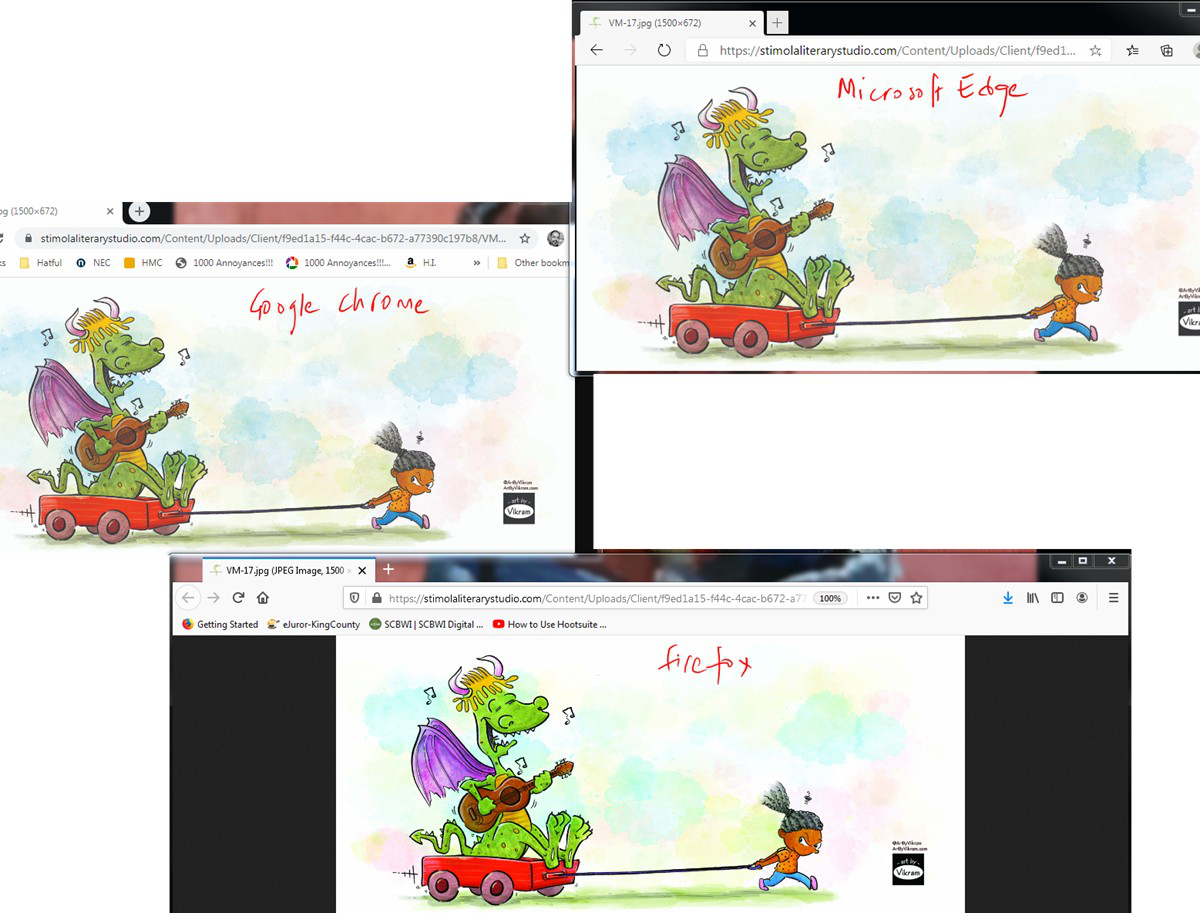
Photoshop lets you set the color mode on JPGs to RGB or CMYK. I found when Firefox (Windows version 77.0.1 64-bit) renders a CMYK jpg, the colors are dramatically off compared to how Chrome and Edge render the same CMYK jpg. See attached image. Not sure if this is a bug or a feature but I thought I should report it anyway. Thanks!
Photoshop lets you set the color mode on JPGs to RGB or CMYK.
I found when Firefox (Windows version 77.0.1 64-bit) renders a CMYK jpg, the colors are dramatically off compared to how Chrome and Edge render the same CMYK jpg. See attached image.
Not sure if this is a bug or a feature but I thought I should report it anyway.
Thanks!
すべての返信 (1)
Hello VM,
Quite frankly (looking at your screenshot): I like the way Firefox
renders the colors better, but that is of course a matter of taste.
Would you please give this a try :
Type in the address bar about:config and press Enter.
(ignore the warning)
Type in the search bar gfx.color_management.mode
Change its vaue to 1 (default = 2)
Then close and restart Fireox.
Does that work for you ?