

このスレッドはアーカイブに保管されました。
必要であれば新たに質問してください。

解決済み
アーカイブに保管済み
Importing address book into T/Bird
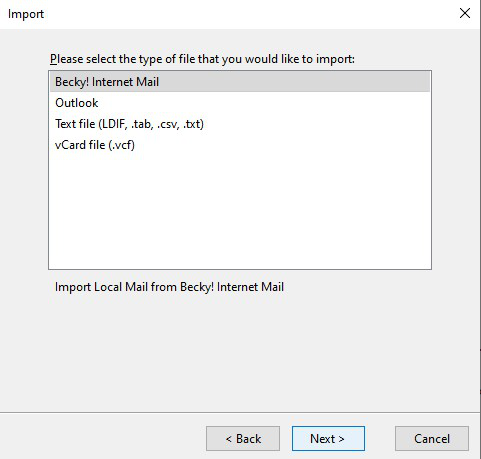
Select "Address Book" from T/Bird Tools; Then select "Tools/Import" from the Address Book pop-up screen. Then select the "Address Books" button for the type of material. You then get another pop-up with a range of formats to choose from. (see image)
In this I get "Becky! Internet Mail" as a selection option (see image)!!! Why and how do I get rid of it?
Please Help.. thanks
Select "Address Book" from T/Bird Tools; Then select "Tools/Import" from the Address Book pop-up screen. Then select the "Address Books" button for the type of material. You then get another pop-up with a range of formats to choose from. (see image)
In this I get "Becky! Internet Mail" as a selection option (see image)!!! Why and how do I get rid of it?
Please Help..
thanks
すべての返信 (1)

選ばれた解決策
Why would you want to remove it? It's not causing any harm to your PC or Thunderbird. You can find out more about what it is here https://en.wikipedia.org/wiki/Becky! then leave it be.