


changed default profile and now can't open firefox. "File not found" page comes up
using win 10. an HP scanning software was downloaded yesterday and i could no longer open email attahments. i went to create a new profile to do a reinstall but 1st tried changing the default profile. now firefox won't start at all and i get a "File not found" error msg. Can anyone please help me?
選ばれた解決策
Did you try to reboot the computer, possibly in Windows Safe Mode with network support ?
この回答をすべて読む 👍 0すべての返信 (3)

Is Firefox still installed? You can do a search on firefox.exe from the Windows search bar.
If Firefox is not found, download it from https://www.mozilla.org/firefox and reinstall it.
If Firefox is still installed, make a note of the location, then try creating a new Firefox profile using the instructions in this article for when Firefox is closed:
Profile Manager - Create, remove or switch Firefox profiles
Here is a shorter version of those instructions:
- Press the Windows key
 and the R key at the same time. A Run dialog will open.
- In the Run dialog box, type in:
firefox.exe -P
(make sure there's a space between firefox.exe and -P) - Click [OK]. The Firefox Profile Manager (Choose User Profile) window should open.
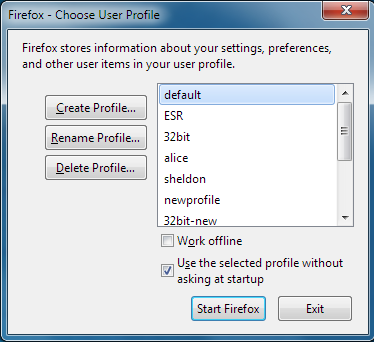
- Note: You can also type
firefox.exe -Pfrom the Windows Search bar and press enter instead of using the Run box.
If the above instructions do not work enter the location of the firefox.exe file instead, for example (make sure you include the quotes):
"C:\Program Files\Mozilla Firefox\firefox.exe" -P
Once the Profile Manager opens, click on [Create Profile] then enter a name for the new profile. Disregard the Choose Folder prompt and click [Finish]. See the Creating a profile section of the article for details.
See if you can now start Firefox from the Profile Manager window, using the new profile.
P.S. If you found the firefox.exe (Firefox program) listed in the Windows Search results, what happens when you double-click on it?
選ばれた解決策
Did you try to reboot the computer, possibly in Windows Safe Mode with network support ?