


Some Address Book entries in Thunderbird 71.0b3 (32-bit) are preceded by a comma

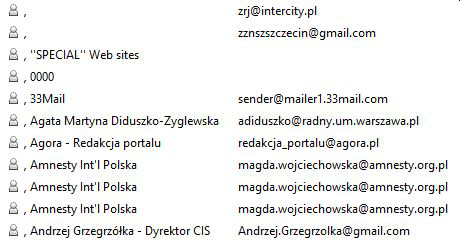
Several weeks ago, I noticed that some entries in Thunderbird 71.0b3 (32-bit) Address Book started automatically to be displayed with a comma preceding the entry proper. I am using the latest Windows 10 Pro. This is the case in Personal Address Book, Collected Addresses, and All Address Books. I'm attaching a screenshot for part of All Address Books and for one selected entry. It is very strange and I have never before experienced such an irregularity. Any idea why this happens and how to rectify the problem? BTW, when selecting an entry preceded by a comma for use in an e-mail (in any address field of it) the corresponding address is entered properly and displays properly.


すべての返信 (5)
I don't see that here with 71b3 32-bit/W10, either with an address book that was copied from an older profile, or with a new profile with new contacts added to Address Book. The commas may be due to the difference between my locale, EN-US, and yours. If you can reproduce it with a new profile, I recommend you report it on Bugzilla.
https://bugzilla.mozilla.org/enter_bug.cgi#h=dupes%7CThunderbird
Thx. I'll try and create a new profile soon. BTW, I set my locale as EN-US, too, although I'm in Poland. I think the symptom I reported belongs to the category of "computer mysteries". Over 30 years of my computer adventure, I've accumulated quite a number of such "computer mysteries" that basically are in-explainable.
Afterwards, I thought the commas might be leftover from importing a csv file with extra commas, but they don't appear in the contact Properties.
Note that 71 stores contacts in abook.sqlite now, instead of abook.mab, so that may be part of the reason for what you see.
Well, but shifting the storage place/file from abook.mab to abook.sqlite is not, normally, noticeable by the user and in no way should affect the Address Book used by Thunderbird before that change. So, should somebody (myself?) report this issue to https://bugzilla.mozilla.org/enter_bug.cgi#h=dupes%7CThunderbird or elsewhere?. I have no experience in reporting bugs. I consider the issue unresolved.
Wlodzislaw said
Well, but shifting the storage place/file from abook.mab to abook.sqlite is not, normally, noticeable by the user and in no way should affect the Address Book used by Thunderbird before that change. So, should somebody (myself?) report this issue to https://bugzilla.mozilla.org/enter_bug.cgi#h=dupes%7CThunderbird or elsewhere?. I have no experience in reporting bugs. I consider the issue unresolved.
File a bug. It is the only way developers get involved in issues like this.