


How to setup text replacements?
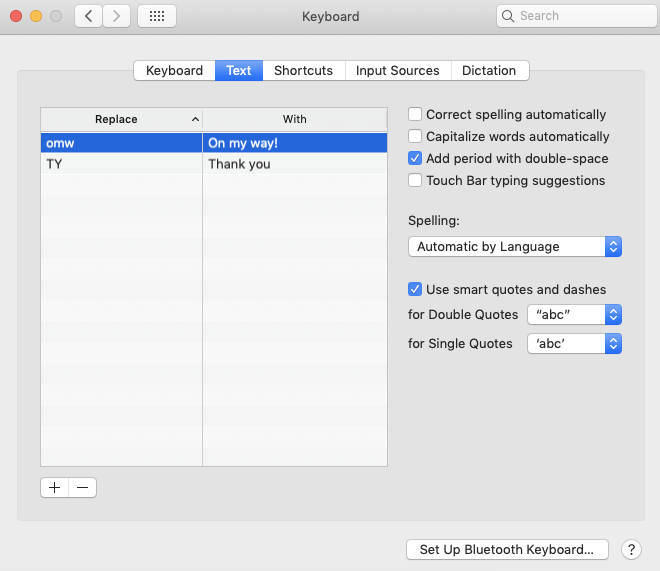
Hello, I am inquiring how to setup text replacements in FireFox i.e. TY = Thank You It is the same exact tool on Mac OS Mojave in Preferences - Keyboard - Text I would like to setup some per-defined rules that automatically change my text as I type. For instance, when typing "TY" in Firefox, when I hit the space bar, I would like it to promptly change the "TY" to "Thank you" (without quotes).
This would help a lot with my productivity at work. I am not sure if there is a way to enable my text replacement shortcuts setup on my Mac to work in Firefox, or if there is some sort of Add-On that would achieve this.
Any help here would be greatly appreciated!
選ばれた解決策
Hello johnuher,
Would you give (one of) these add-ons a try (?):
https://addons.mozilla.org/en-US/firefox/addon/foxreplace/
and:
https://addons.mozilla.org/en-US/firefox/addon/textfast/
Any good ?
この回答をすべて読む 👍 1すべての返信 (3)
選ばれた解決策
Hello johnuher,
Would you give (one of) these add-ons a try (?):
https://addons.mozilla.org/en-US/firefox/addon/foxreplace/
and:
https://addons.mozilla.org/en-US/firefox/addon/textfast/
Any good ?
1000x Thank you!!! Really appreciate it. The second add-on listed (TextFast) is exactly what I am looking for. God bless you!
My pleasure - I'm really glad that "TextFast" works for you !