


How to disable firefox asking if I really want to launch .msi file?
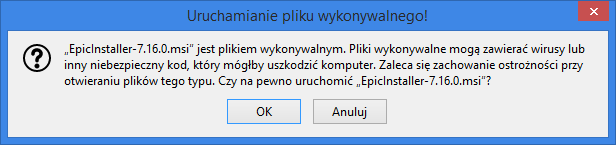
Every time I download *.msi file and try to launch it through firefox last downloads menu (or library window) firefox warns me that this is executable file and asks do I really want to launch this. This is really annoying.
How to disable this warning?
P.S. I do not want to use about:preferences#privacy to disable warning me about insecure downloads! I want to only remove this stupid warning before launching legitimate .msi files just because they are .msi files. I still want firefox to scan all downloads.
この投稿は Piterk により に変更されました
選ばれた解決策
OK, I've found it in the source code.
Add the following pref: browser.download.skipConfirmLaunchExecutable = true
Code line Bug 1472635 Btw, it's there since Fx63 :).
この回答をすべて読む 👍 1すべての返信 (6)
Go to about:config and set browser.download.manager.alertOnEXEOpen = false.
Unfortunately it did not help. I had it on disabled earlier. I have no warning on exe files, only on msi files. This is something new, silently added in firefox 65.
選ばれた解決策
OK, I've found it in the source code.
Add the following pref: browser.download.skipConfirmLaunchExecutable = true
Code line Bug 1472635 Btw, it's there since Fx63 :).
この投稿は TyDraniu により に変更されました
I created string and set it to true and it did not work. Now I cannot create boolean because it only changes what string says.

...
- Right-click on the pref and select Resetuj.
- Restart the browser.
- Try again to create a boolean preference.
Thanks! That solved the problem, string disappeared after resetting it. Now I created boolean and message is not popping up on msi files!