


Your connection is not secure for all website, it is making firefox is useless. Try to address it as soon as possible

We are getting the following error message The certificate is not trusted because the issuer certificate is unknown. The server might not be sending the appropriate intermediate certificates. An additional root certificate may need to be imported. Error code: MOZILLA_PKIX_ERROR_MITM_DETECTED
We are not using any AVAST, but we are using mcafee. Import root certificate to, but it is still failing and unable to find the company root certificate.
選ばれた解決策
if you know that you're man-in-the-middling https connections in your corporate network, you could turn security.enterprise_roots.enabled in about:config to true and restart firefox once (should work in versions 63 and upwards)...
この回答をすべて読む 👍 2すべての返信 (6)
hi, please give us more information about the error by clicking on the error code, copying the text to the clipboard and then pasting it here into a reply in the forum like shown in the screenshot.
thank you!
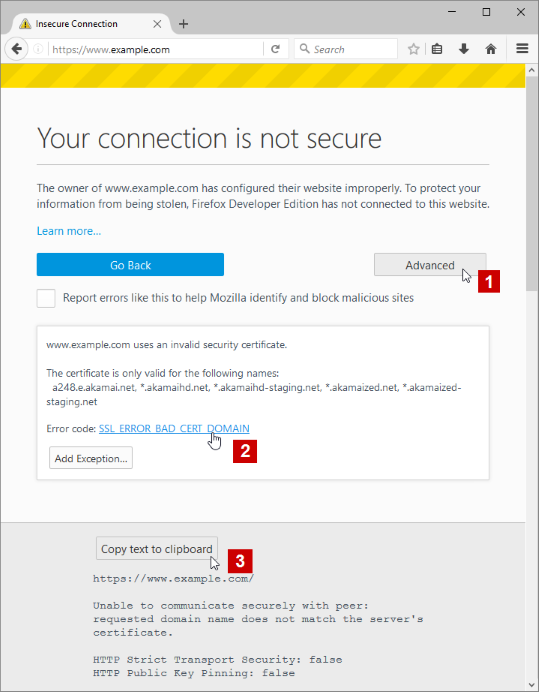
Your connection is being intercepted by a TLS proxy. Uninstall it if possible or configure your device to trust its root certificate. HTTP Strict Transport Security: false HTTP Public Key Pinning: false
Installed our company root certificate. but still browser unable to recognize the root certificate
選ばれた解決策
if you know that you're man-in-the-middling https connections in your corporate network, you could turn security.enterprise_roots.enabled in about:config to true and restart firefox once (should work in versions 63 and upwards)...
What is the value of this pref on the about:config page?
- security.pki.mitm_canary_issuer
You can open the about:config page via the location/address bar. You can accept the warning and click "I accept the risk!" to continue.
security.pki.mitm_canary_issuer;C=US,ST=CT,L=XXXXX,OU=XX Corporate IT,O=XXXXXXXXXX XXXX XXXXX,CN=XXX External Issuing CA 201811021000