


TLS Configuration Paramaters

I must admit to being confused about how to reasonably set TLS related values in today's world.
I have vendors telling me I need to have TLS 1.2, and I have set the values for what I believe are the relevant parameters in about:config as follows:
security.tls.version.fallback-limit 3 security.tls.version.max 4 security.tls.version.min 2
I am having access issues with some web sites and my HP Printer's Web Servers with the above minimum setting.
If I set the min to 1 (V1.0) I can get to my printers with a warning the ":Your connection is not secure" but can set an exception. With the parameter set to 2 (V1.1) I get an "Error code: SSL_ERROR_UNSUPPORTED_VERSION" and an option to restore the default settings.
It seems like I would always want to support the best (max version) of TLS (1.4). Practically I need to support 1.0 for now. Can someone please explain the fallback-limit and how these play together?
すべての返信 (8)
Firefox has supported TLS 1.2 by default since Firefox 27.0 Release (Feb 4, 2014) as per Bug#861266.
From Firefox 61 Release Notes:
On-by-default support for the latest draft of the TLS 1.3 specification
There are TLS settings prefs on the about:config page that specify the minimum and maximum TLS version.
- security.tls.version.min = 1
- security.tls.version.max = 4
1 means TLS 1.0 2 means TLS 1.1 3 means TLS 1.2 (default as of 27.0 to 59.0 Releases) 4 means TLS 1.3 (default as of Fx 60.0 and later)
RangerZ said
I must admit to being confused about how to reasonably set TLS related values in today's world. I have vendors telling me I need to have TLS 1.2, and I have set the values for what I believe are the relevant parameters in about:config as follows: security.tls.version.fallback-limit 3 security.tls.version.max 4 security.tls.version.min 2 It seems like I would always want to support the best (max version) of TLS (1.4). Practically I need to support 1.0 for now. Can someone please explain the fallback-limit and how these play together?
The site is saying you need a web browser that supports TLS 1.2 which current versions of web browsers do.
It is not recommended to set the min from the default 2 for TLS 1.1 to 1 for TLS 1.0. There is no TLS 1.4 yet as it was only recently that Firefox supported recent drafts of TLS 1.3 by default.
Hi RangerZ, the default settings provide a good experience because Firefox will try to connect with the highest level of security but can still work with servers that don't support those levels.
If you ever wonder what protocol is currently in use on a site, you can use the Page Info dialog, Security tab, to see that information. Either:
- right-click (on Mac Ctrl+click) a blank area of the page and choose View Page Info > Security
- (menu bar) Tools > Page Info > Security
- click the padlock or "i" icon in the address bar, then the ">" button, then More Information
The section at the bottom has a bold heading that mentions the cipher and protocol of the current page's connection. (I don't know if there is an easier place to see this!)
My question still stands: Can someone please explain the fallback-limit and how these play together?
I unfortunately feel I am forced to allow TLS 1.0. I have some sites I need to access, but I could white list these and would be willing to deal with others as they arrive. At the moment its under 10. Not aware this is possible.
My last paragraph has an error and should have the version of 1.3 (=4)
The "fallback limit" is hard to explain. This is my understanding.
Let's say Firefox contacts a secure server and the server says it can provide TLS 1.2, TLS 1.1, and TLS 1.0.
Firefox will try to connect using TLS 1.2.
If that fails and fallback is allowed, then Firefox would try the next lower protocol, TLS 1.1, and so on.
However, this kind of protocol downgrade was employed in the "Poodle" attack to get browsers to use the insecure SSLv3 protocol, so while the first line of defense was to disable SSLv3, most browsers ALSO disable fallback.
The security.tls.version.fallback-limit preference lets you customize this behavior. So for example, with these settings --
- security.tls.version.max = 4
- security.tls.version.fallback-limit = 4
-- if the server offers TLS 1.3 but Firefox isn't able to connect with that protocol, then the connection fails. With these settings --
- security.tls.version.max = 4
- security.tls.version.fallback-limit = 3
-- Firefox can fall back (downgrade the protocol) to TLS 1.2 instead of being forced to use TLS 1.3, but no lower.

James said
It is not recommended to set the min from the default 2 for TLS 1.1 to 1 for TLS 1.0.
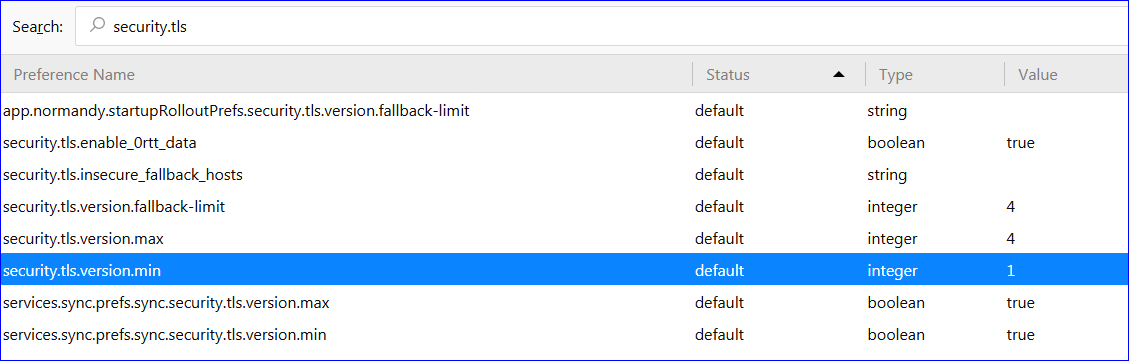
Is the default for 'Minimum' different in FF 62? I have 61 and my default is 1: (see image)
この投稿は Pj により に変更されました
Firefox 62 default on mine:
security.tls.version.min = 1
Sometimes setting changes are trickled out over time for testing, so some users might have 2 if that is happening, but I haven't heard about it happening with Firefox 62 users.
jscher2000 said
The security.tls.version.fallback-limit preference lets you customize this behavior. So for example, with these settings ---- if the server offers TLS 1.3 but Firefox isn't able to connect with that protocol, then the connection fails. With these settings --
- security.tls.version.max = 4
- security.tls.version.fallback-limit = 4
-- Firefox can fall back (downgrade the protocol) to TLS 1.2 instead of being forced to use TLS 1.3, but no lower.
- security.tls.version.max = 4
- security.tls.version.fallback-limit = 3
I have done some testing with a site that appears to only support 1.0 and I can still access it if the fall-back-limit is higher.
I am not clear why any site would want to offer multiple levels or why a site's highest level would be unavailable.
So I think my best compromise to the security would be to set the fall-back limit to 4. This would allow all the versions to work but only at the highest offered by a site. In the rare case that is not available I would then get the TLS error.