


How do I import mbox file?

I want to use Thunderbird to search and access my mbox file on my own computer. One site told me to go to "tools" then click on "import" and then select "mbox." I followed the first two steps, but there was no "mbox" option at the end of the process, as can be seen in the attached screen print. How do I import an mbox file to Thunderbird so that I can use Thunderbird to search for specific e-mails? Thanks.
すべての返信 (4)
Here's the screen shot which for some reason wouldn't upload successfully before.
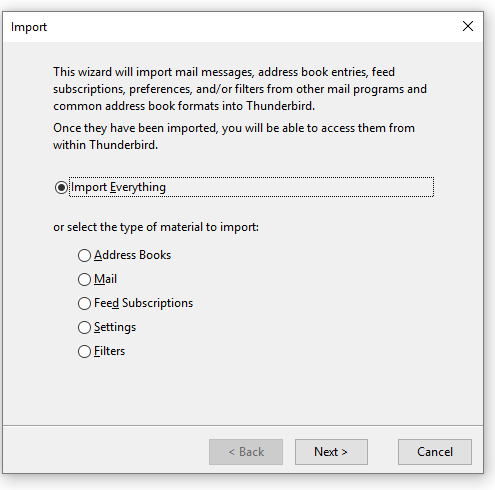
Repeat 'cause I thought the first was fuzzy -- but looks like all thumbnails are fuzzy.
この投稿は b98765 により に変更されました
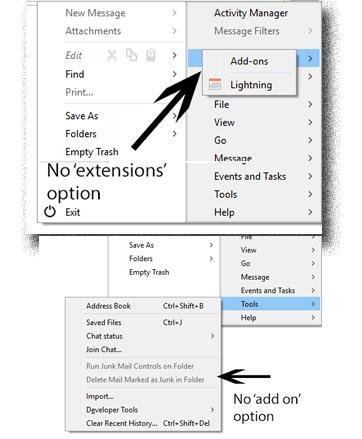
Thanks for the help, but the installation is not working for me. The instructions say to download the extension, start Thunderbird and then go to: tools>add ons> extensions.
I have done this, but there is no 'add on' option under tools after I restart Thunderbird. Also, there is no 'extensions' option under 'add ons'.
b98765 said
Thanks for the help, but the installation is not working for me. The instructions say to download the extension, start Thunderbird and then go to: tools>add ons> extensions. I have done this, but there is no 'add on' option under tools after I restart Thunderbird. Also, there is no 'extensions' option under 'add ons'.
Have you actually tried clicking the add-on menu entry you have found? I strongly suggest you do.
Then I strongly suggest you read this article https://support.mozilla.org/en-US/kb/installing-addon-thunderbird