


Why does v57 sometimes jump to using 25GB of RAM for FirefoxCP Web Content?

Only since I upgraded to v57, FirefoxCP Web Content routinely reaches around 2GB RAM to support two or three open Tabs. But on occasion, it will suddenly attempt to use as much as 25GB RAM of FirefoxCP Web Content for a single Tab. I only have 16GB on the my MacBook Pro, so the Swap file becomes unmanageable, and everything grinds to a halt.
選ばれた解決策
mkregor said
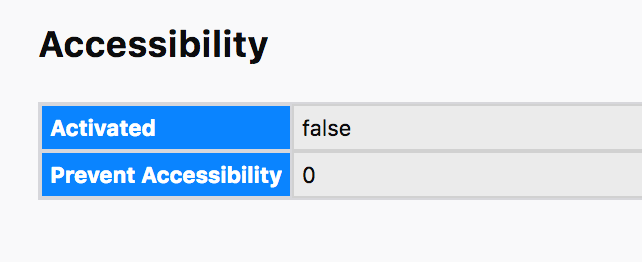
I updated to 57.0.1, so I guess we'll see if that helps. I also looked at the Troubleshooting information and found three listings for accessibility. The one under the Accessibility section is set to False. I can't seem to to change it. Should I be able to? Should I still uncheck the Prevent Accessibility Services option? Screenshots attached:
"...if accessibility is set to "true" there. if yes, go to..." so no as is false. Yes can go un-tick it if not needing it for accessibility. Does no harm, maybe saves some ram.
So this should then be Solved .
すべての返信 (3)
If go to Help and ABout see if Firefox updates to 57.0.1 if not shut down Firefox then Repeat as the update fixes this issue.
Alternatively : Please Go to the Firefox 3 Bar Menu --> Help ? --> Troubleshooting Information Page and take a look in the Accessibility section if accessibility is set to "true" there. if yes, go to the Firefox 3 Bar Menu --> Options --> Privacy & Security panel and under Permissions check the setting to Prevent Accessibility Services from accessing your browser. Restart Firefox
Please let us know if this solved your issue or if need further assistance.
I updated to 57.0.1, so I guess we'll see if that helps. I also looked at the Troubleshooting information and found three listings for accessibility. The one under the Accessibility section is set to False. I can't seem to to change it. Should I be able to? Should I still uncheck the Prevent Accessibility Services option? Screenshots attached:

選ばれた解決策
mkregor said
I updated to 57.0.1, so I guess we'll see if that helps. I also looked at the Troubleshooting information and found three listings for accessibility. The one under the Accessibility section is set to False. I can't seem to to change it. Should I be able to? Should I still uncheck the Prevent Accessibility Services option? Screenshots attached:
"...if accessibility is set to "true" there. if yes, go to..." so no as is false. Yes can go un-tick it if not needing it for accessibility. Does no harm, maybe saves some ram.
So this should then be Solved .