


Automatic Saving of Email Address

Hi,
In my Thunderbird, I have two email ID's. One is a private email, and one is a business email. I also have three Address Books namely Personal, Private and Business. When there is any incoming email or outgoing email (to or from either of the email ID's), all the email address are saved in the Personal Address Book. Is there any way that any email directed to the private email gets its email address stored in the Private Address book. In the same way any email coming to or sent out from the Business email, gets all the email address relative to it stored automatically in the Business Address Book. Any advice shall be appreciated.
Thanks,
LS
すべての返信 (10)
A filter should make it. Do this after send: "If from is your-private-address and reciever is not in my personal address-book add receiver in my personal address-book"
And a second filter for business
この投稿は Gnospen により に変更されました
You need to have FiltaQuilla add-on
Gnospen,
There is no option for add receiver in my personal address-book. The only option available is Add Sender to Address List. Any advice?
Thanks, LS

You're clearly doing something out of the ordinary in that you're sending to addresses that Thunderbird doesn't already know. Most users will have a stable address book containing all their frequently used Contacts, so adding unknown recipients just doesn't happen. So I surmise that you're working with lists of addresses collected elsewhere and you are pasting, or in some other way inserting these into messages.
This sounds like a bulk mailing operation, and to be frank, this isn't the kind of use that Thunderbird was written for. It's not really the right tool for that particular job.
I don't know of any way to automate this. You could add the new recipients to the address book beforehand, but I don't think that would be easy or efficient.
Another approach might be to use an add on to crawl your Sent folder for recipient addresses but I don't think this could differentiate automatically between different accounts. You'd have to run it on each Sent folder.
https://freeshell.de/~kaosmos/index-en.html#eac
It's not automatic, but it's less work than dealing with every outgoing address individually.
Zenos, your assumption is correct. Thanks for the suggestion. Thanks Gnospen.
There might be another solution. If you search your SENT -folder where to is not in your addressbook Save this to a .csv -file Open that .csv as a spreadsheet, delete all column except recipient Save it Use add-on MoreFunctionsForAddressBook to import the raw data.
Zenos solution works fine, The https://freeshell.de/~kaosmos/index-en.html#eac is updated (the one on addons.mozilla.org is NOT)
この投稿は Gnospen により に変更されました
Are we making it harder then it should be? Option / composition / Addressing / "automatically add outgoing email to my: Collected addresses"
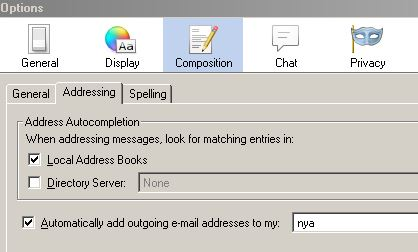
I think that misses the requirement to file outgoing addresses according to which account was being used. They'd all be bundled into one address book, with no way to refer back to which identity had been used when sending them.
Your right, how about different profiles?