


The most recent firefox version is no longer compatible with basic extensions, and my touchpad no longer functions. How do I fix this?

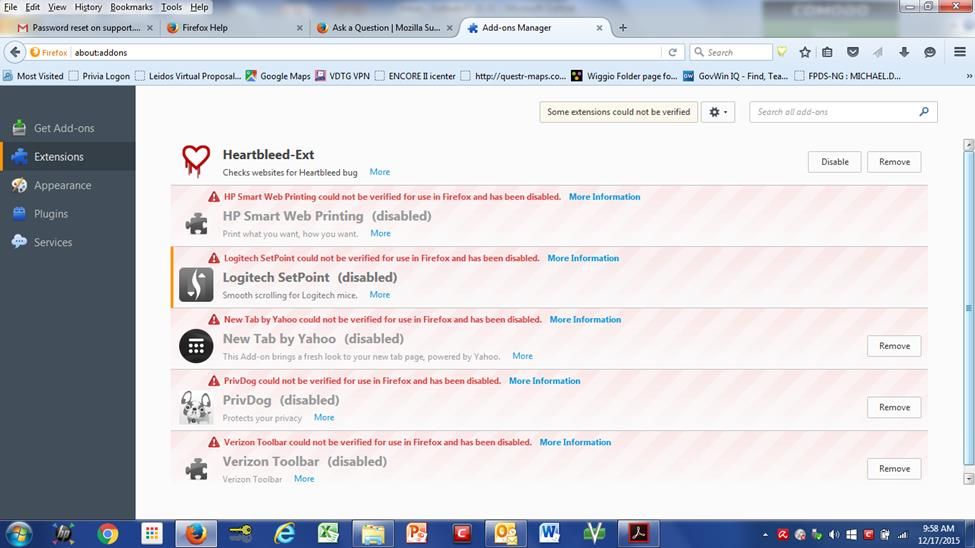
Add-on Manager shows five extensions are disabled now that I've upgraded to v. 43.
One of them is LogitechSet Point. The message is that this extension couldn't be verified and has been disabled.
The other extensions that have been disabled include PrivDog and HP Web smart printing.
Most annoying, particularly because I can no longer use my touchpad.
すべての返信 (1)
Addons that are not signed have been disabled in the latest version of Firefox for security purposes. To enable this addon again, please do the following:
- Type
about:configin the address bar - Click the I'll be careful button
- Locate the
xpinstall.signatures.requiredboolean - Change the value on this preference to
false
Note: You may need to restart Firefox in order for the changes to take effect.
Warning: Doing the above steps may present a security threat. Please use with caution and at your own risk.
For more information about addon signing, please refer to this Mozilla support article.