


I want to put the icon tray back at the bottom of the page.

My icon tray has always been at the bottom of the screen, until I updated Firefox, now it's at the top of the screen. How do I put it back at the bottom?
すべての返信 (5)

選ばれた解決策
Hi, this doesn't sound like a Firefox issue. If you are referring to the Windows Taskbar, right click in the Taskbar > Properties (Taskbar tab) - 'Taskbar location on screen,' and select Bottom.
If your question is resolved by this or another answer, please take a minute to let us know. Thank you.

Hello,
In order to better assist you with your issue please provide us with a screenshot. If you need help to create a screenshot, please see How do I create a screenshot of my problem?
Once you've done this, attach the saved screenshot file to your forum post by clicking the Browse... button below the Post your reply box. This will help us to visualize the problem.
Thank you!
It's the Icon tray at the very top, that includes the time & date. This was, previously, at the bottom of the page, I'd like it back there.
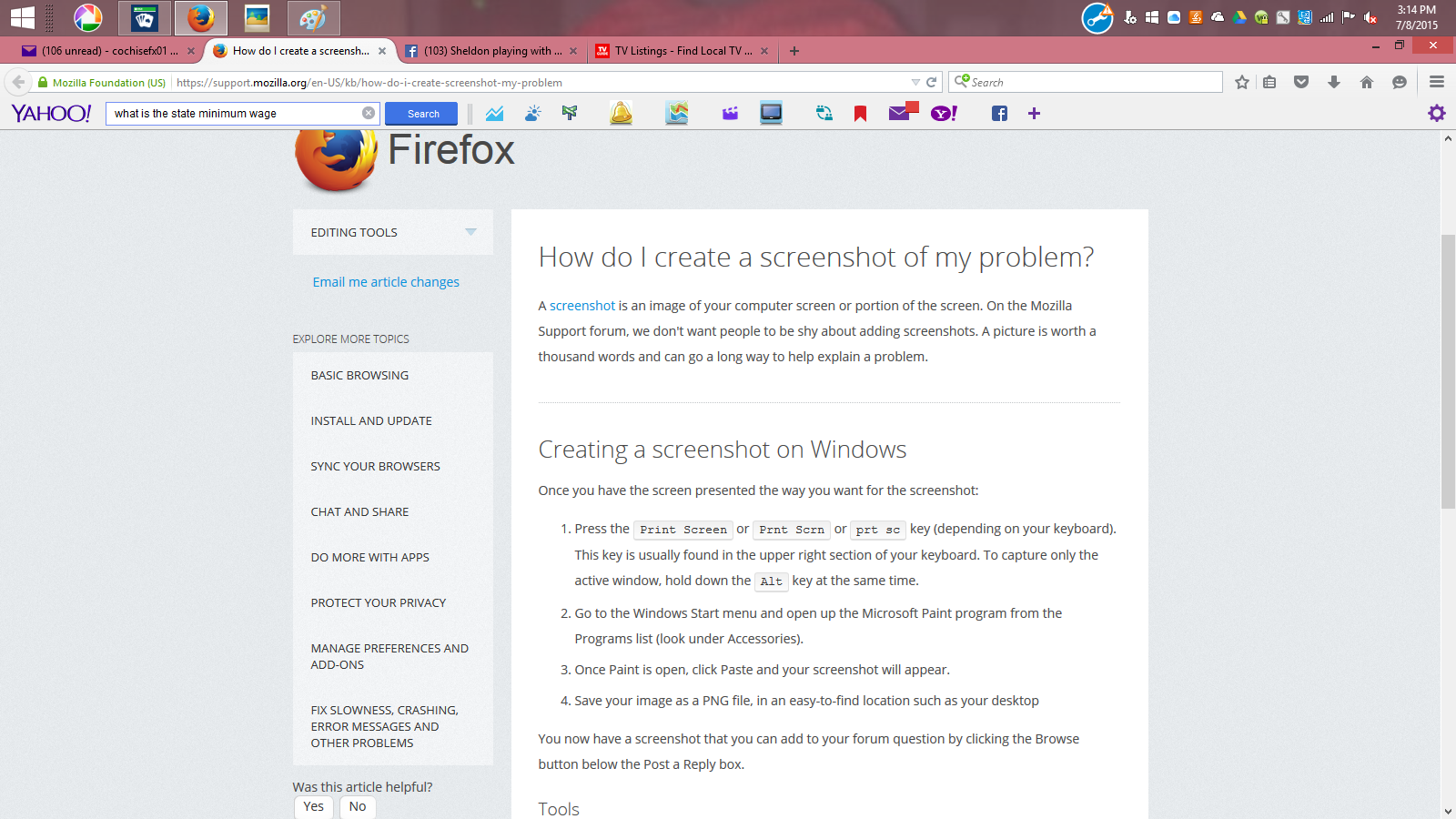
That is your computers display. Not Firefox
You can drag the Windows Task bar back to its position at the bottom and lock the toolbar via the right-click context menu.