


How do you copy multiple emails 'documents' folder on computer

I need to be able to file my emails into my normal 'documents' folders in the same way that you would save any file. They need to be retrievable back to Thunderbird. I can do this singly, but want to be able to do multiple emails to save my sanity! Downloaded Freeviewer Add-on but find it unstable and never understand whether to do 'html' or 'plain text'. Thanks.
選ばれた解決策
This is what you want -
https://addons.mozilla.org/en-US/thunderbird/addon/importexporttools/
この回答をすべて読む 👍 1すべての返信 (4)
Sounds like you are only selecting one email.
To select a batch of contiguous emails: select first email Hold down 'shift' key and select last email - all emails in between become highlighted.
To select various emails: Hold down 'Ctrl' and click on the various emails to highlight
right click on highlighted emails and select 'Save as' select the folder where you want them to go click on 'Select folder' button Each email will be saved to the designated file and you may need to click ok for each one.
Alternative method.
Download Importexporttool add extension
Save file to desktop or downloads folder
How to install: In Thunderbird
- Tools > Addons OR Menu icon > Addons
- click on gear wheel icon and select 'Install addon from file'
- locate the xpi file you downloaded and click on Open
- you may need to restart Thunderbird.
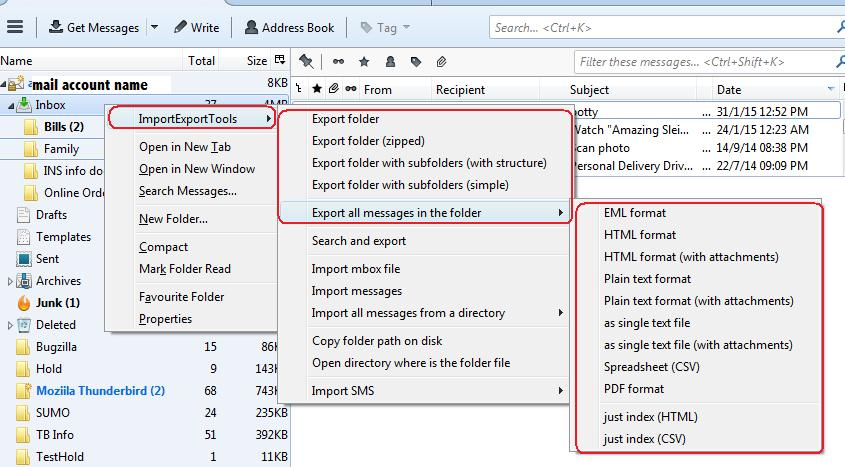
then right click on folder > Importexporttools > 'Export all messages in the folder > Eml format see image below
OR right click on highlighted emails select 'Save selected messages as' > eml format select folder and click on 'Select folder' button.
Thanks. V helpful. Had been highlighting multiples - doesn't work without Freeviewer and with Freeviewer am still finding it a bit unstable (ie, sometimes it works and sometimes it doesn't). Also, on my tests, when I do manage to copy a load of multiple emails I can't then delete them!!! Will keep trying and report back.
yes.. windows is a pig is it not.
One of the commenters on my blog suggested "right click the file name -> select properties -> down at the bottom select Advanced -> then Uncheck "Allow this file to have contents ........" -> select OK -> select OK. I could then delete the file."
Editing the registry was my solution http://thunderbirdtweaks.blogspot.com.au/2011/10/cant-delete-eml-files.html

選ばれた解決策
This is what you want -
https://addons.mozilla.org/en-US/thunderbird/addon/importexporttools/