


Windows 10 reached EOS (end of support) on October 14, 2025. For more information, see this article.

Mozilla サポートの検索

サポート詐欺に注意してください。 私たちはあなたに通話やショートメッセージの送信、個人情報の共有を求めることはありません。疑わしい行為を見つけたら「迷惑行為を報告」からご報告ください。

詳しく学ぶ

このスレッドはアーカイブに保管されました。 必要であれば新たに質問してください。

html5 video: remove the play overlay

  • 1 件の返信
  • 3 人がこの問題に困っています
  • 95 回表示
  • 最後の返信者: poupoule

Web developer's question:

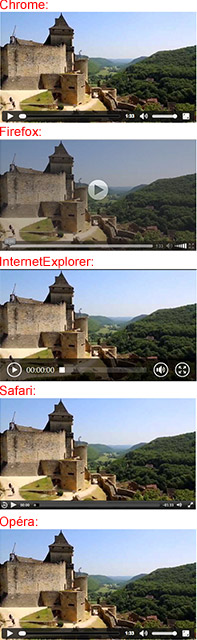
In html5, using the tag /video/ to play a video in a very standard way, without the autoplay attribute, when the video waits to be played on the loaded page, there is a black transparent overlay over the entire surface of the poster, with a white round play button on the middle...

Please, How to remove, or hide, this overlay with its white round play button over it, using CSS?

Note that IE, Chrome, Safari or Opera do not have such feature... If it is implemented on Firefox we can expect there is a way to control this feature.

Thanks.

Web developer's question: In html5, using the tag /video/ to play a video in a very standard way, without the autoplay attribute, when the video waits to be played on the loaded page, there is a black transparent overlay over the entire surface of the poster, with a white round play button on the middle... Please, How to remove, or hide, this overlay with its white round play button over it, using CSS? Note that IE, Chrome, Safari or Opera do not have such feature... If it is implemented on Firefox we can expect there is a way to control this feature. Thanks.

この投稿は poupoule により に変更されました

すべての返信 (1)

Here, on the image, is how the video tag renders on various browsers. Obviously Firefox has an overlay with a little round play button on the middle. This is exactly what I need to remove.
この投稿は poupoule により に変更されました