


My main 'Profile' in T-Bird start up not there

On T-Bird start up I'm given a list of (originally) four Profiles. Currently I only use Profile Three, but on start=up today it is not there. Doing the usual searches does not list it, only 'default', 'new user' and 'profile two'. Is there any way to recover it?
All Replies (17)
Does profile folder "Three" still exist in folder "Profiles" in .....\AppData\Roaming\Thunderbird\Profiles\ ? The way to verify: in Thunderbird go to Help > Troubleshoot Information > Profiles > about:profiles ....
Unfortunately no
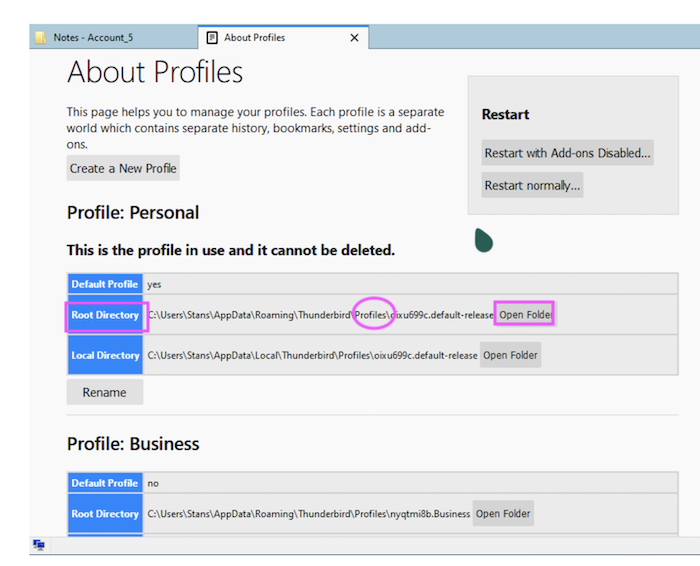
Go back to Help > Troubleshoot Information > Profiles > about:profiles .... Click on Open Folder in one of the profiles: this will open the selected profile in your file explorer. From there go one step higher in the folder hierarchy to the folder "Profiles" and make a screen shot of its contents. Now go still one step higher to the folder Thunderbird which contains a file "profiles.ini" Open this file in a text editor and make a screen shot of its contents
Edeziri site na Mapenzi
OK got screen shot of the profiles.ini files - do you want to see that??
In order to help you I would like to see the screen shot with the contents of the "profiles.ini" file as well as a screen shot of the "Profiles" folder.
OK - Two screen shots attached
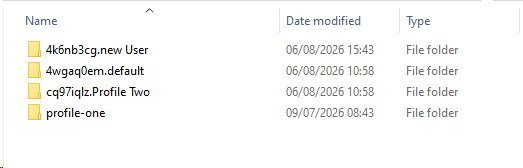
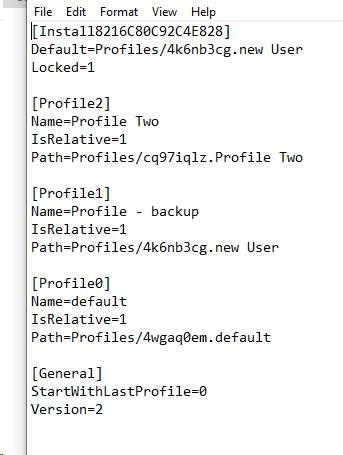
I cannot see a "Profile Three" neither in Profiles nor in profiles.ini You seem to use profile "new User" and/or "Profile Two". There is a "profile-one" in "Profiles" but it is not included in profiles.ini Actually when you start Thunderbird it opens the profile manager window. Please show a screen shot of the profile manager window (see image).
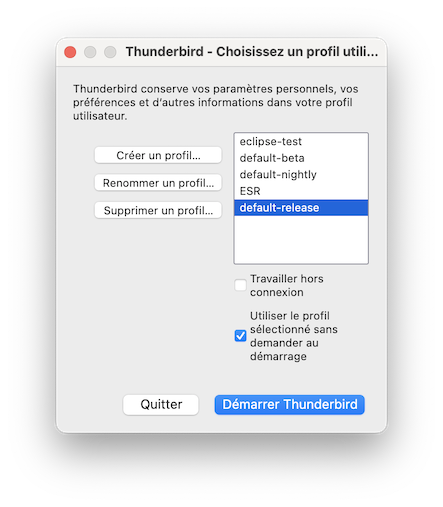
Attached. As you will see there are three Profiles, usually there were four, with Profile Three the lowest, which the one I used all of the time. It's just not there as of this morning.. (The one listed 'Profile - backup', was originally 'New User', but I currently am using that to at least to keep my own emails coming in - I have about 10 others that will have to be reinstalled!)
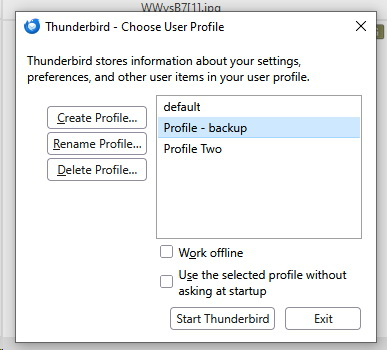
There is no Profile Three and I don't know where you could look for it, unless you have a recent backup copy of the complete folder "Thunderbird" with Profiles and profiles.ini To explore what is in "profile-one" I propose to create a new profile in the profile manager, then connect it via "Choose Folder" with the folder "profile-one" in Profiles and finally start Thunderbird in this profile.
What does " I have about 10 others that will have to be reinstalled!" mean? Ten other profiles or ten accounts?
This is all refers to my main desktop computer. The '10 others' refers to other email accounts that were all part of this Profile. I can re-establish all of them, but of course will have lost any previous emails. I do have my main email (ie the <mat@matirvine.com>) on on my laptop, so I could in theory transfer them all to the desktop. I have also lost the address book, but that will eventually recreate itself. Thanks
Yesterday I told you how to explore the contents of "profile-one" because this might be the profile you had deleted a while ago. "profile-one" has a modification date from July 9, 2026 which is one month ago. Following my instructions did you succeed in opening it and is it the profile you are looking for?
Edeziri site na Mapenzi
mat12, in the follow-on discussion that you started, you wrote that you deleted a profile, but information in your message suggests that you deleted an account. Which is it?
The title of this thread is "My main 'Profile' in T-Bird start up not there"
I think the two terms 'profile' and 'account' have got mixed here, it concerns a 'profile' but overall I suppose that is part of my Thunderbird 'account'? Briefly two days ago on starting the computer, starting T-Bird is the first thing I do. However that day I got a screen full of 'odd' windows, though amongst them was the T-Bird 'Profile' menu. Some time ago I started a new Profile (which ended up being Profile Three), but the list also included - default, new user, Profile Two as well as Three. (The others are there either by default or legacy.) But I also got a window that indicated 'You are about to delete a Profile' - I still don't know why or how it appeared, but it did. Thinking back I now recall that this indicated I could 'save the folders', 'delete' or (I think? ) 'quit or cancel??'. I'm 99% sure I pressed 'save'. On re-starting T-Bird, the original Profile Three was missing. That was the basis of my first message. "Profile Three is missing, can it be recovered?" During yesterday I was exploring more details on recovery and it appears if I pressed 'save folders', that they are still there, but stored elsewhere in 'storage'. That was the question in my second post of today. However I got told off as apparently it should be a continuation of this thread! Apologies if I offended anyone, but I thought it was a new question. Currently I have rebuilt most of the mailboxes that got deleted (I have about 12 on this Profile), and mail is coming in, and existing mail has reappeared. This - to me - links to the fact that it is still 'somewhere', as this is more than would be stored on my server? (This is set to keep for 40 days). What has not reappeared however is the address book - which is probably the most important item. I can usually solve most computer problems, but this one has me stumped. So any help, gratefully received.
mat12, it is difficult to help when you give different definitions to terms as it they are normally used. You have a Thunderbird installation (NOT a Thunderbird account!!) in which you had created four profiles, then inadvertently deleted one of those four profiles. Each profile can contain several email accounts - one email account for every email address you want to use with Thunderbird. Actually each time when you start Thunderbird it automatically opens the profile manager since your profiles.ini file contains these lines
[General]
StartWithLastProfile=0
Version=2
.... the 0 (zero) meaning TB opens the profile manager when you launch it, and you will select one of the profiles to use it. Probably once you have erroneously clicked on "Delete Profile...." and confirmed delete and since then the profile manager displays only three profiles.
However your folder Profiles still contains FOUR profile folders - each profile folder should correspond to one of your profiles, whereas your profile manager and the profiles.ini file show only THREE profiles.
That's why i guessed that the missing profile (you call it profile Three) corresponds to the profile folder "profile-one". Furthermore I suggested to explore profile-one and I explained how to do this.
But you didn't even try and I will stop my help here since it becomes inefficacious to always repeat the same suggestions...
mat12 said
During yesterday I was exploring more details on recovery and it appears if I pressed 'save folders', that they are still there, but stored elsewhere in 'storage'. That was the question in my second post of today. However I got told off as apparently it should be a continuation of this thread! Apologies if I offended anyone, but I thought it was a new question.
It was me who told you off in your second thread since this was no new problem but still the same. But sincerely I was not offended, I only wanted to continue my help You have deleted profile Three and want to know where are located the data folders and files of the missing profile. I told you to explore the profile folder "profile-one" in Profiles, but instead you began to re-create the accounts of the missing profile. Even if the forth profile folder in "Profiles" is named "profile-one" the profile name can be different since the profile manager offers to rename profiles. Renaming a profile does not rename the accompanying profile folder
Sorry if I complicated things unnecessarily. The delete confirmation sounded like it was for deleting an account, and mat12 said that the issue was separate from their profile issues, so I wanted to be certain, especially because of a concern about lost data, which sometimes is not lost in deleted accounts.