


Thunderbird for Android POP3 issue - messages disappear from Inbox

Hello,
I would like to report what appears to be a bug in Thunderbird for Android.
I use a POP3 account with the following settings:
POP3 Port 995 SSL/TLS
The same account works correctly in Thunderbird for Windows.
The problem only occurs in Thunderbird for Android.
What happens:
New emails arrive and are initially displayed in Thunderbird for Android. After the next synchronization, some messages disappear from the Inbox. The messages are not deleted from the server because they are still visible in Thunderbird for Windows. I also tested the same POP3 account in Samsung Email on the same Android phone. Samsung Email continues to show the messages correctly while Thunderbird for Android no longer shows them.
Troubleshooting already performed:
Reinstalled Thunderbird for Android. Removed and added the account again. Tested on both my Android phone and Android tablet. The same problem occurs on both devices.
Is this a known issue with POP3 accounts, or is there another setting I should check?
Thank you very much for your help.
Best regards, Diana
All Replies (3)

Hi Diana
Is the configuration in Thunderbird for Android definately setup to use pop. Can you share a screen shot from it's settings page
- Settings > account name > fetching mail > incoming server.
Pop3 connections by default delete emails from the server unless you've specifically configured your provider webmail settings and apps to retain them on the server.
The following scenario / setup could create the effect you describe.
- Thunderbird for Android using Imap.
- TB Desktop using Pop.
- TB Android downloads your email (imap)
- TB Desktop (or other pop client) downloads the email and deletes it from server (pop default)
- TB Android synchronises it's view to match the server.
- TB Android deletes its copy of the email because its no longer available on the server.
Have you logged onto your providers webmail and checked if the email is within it's inbox. Don't assume it is because your email is available in Thunderbird desktop.
Edeziri site na Platform34
Thank you for your reply.
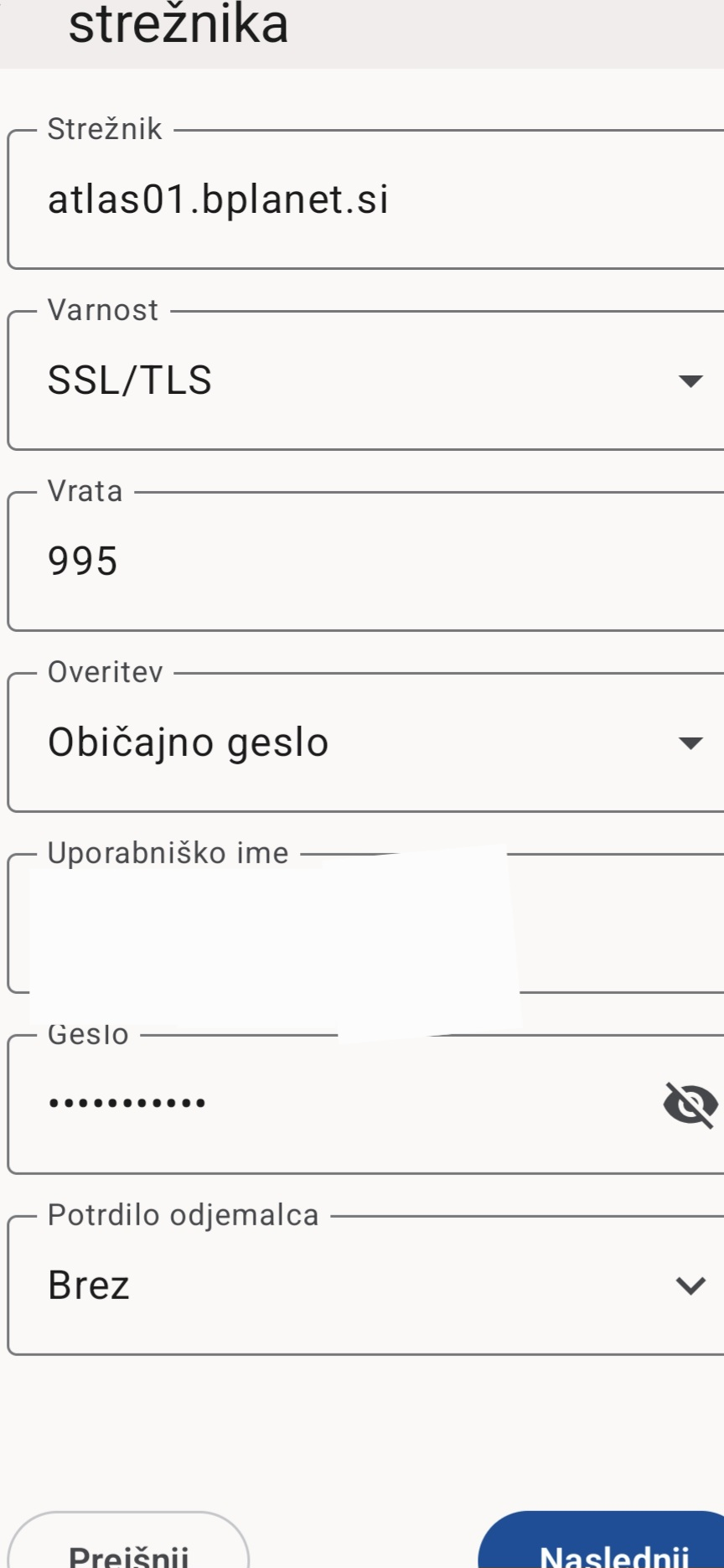
Please find attached the screenshot of my Thunderbird for Android incoming server settings.
Thunderbird for Android is configured as POP3 (port 995, SSL/TLS), not IMAP.
Thunderbird for Windows is also configured as POP3.
I also tested the same POP3 account in Samsung Email on the same Android phone. Samsung Email continues to display the messages correctly, while Thunderbird for Android gradually stops showing them.
For example, a new email appears in Thunderbird at first, but after synchronization it disappears. The same email remains visible in Samsung Email and in Thunderbird for Windows.
Thanks for the pop confirmation. Much appreciated.
Did you have an oppertunity to confirm if the messages remain are on the server?
1. Can you also try unticking "Sync server deletions" under settings > account name > fetching mail. I'd normally associate this as an imap feature however it's worth ruling out. Also look at the other deletion settings on the same page and set as appropriate.
2. Do you by any chance have the message list sorted by read/unread status. This can give the appearance of messages being deleted when they're actually just moved lower in the list once read. It's caught a few people out.
I don't use a pop account so i'm not placed to try and replicate the behaviour.
If you don't find the answer, you can log a bug report on github below. https://github.com/thunderbird/thunderbird-android/issues