


Windows 10 reached EOS (end of support) on October 14, 2025. If you are on Windows 10, see this article.

Search Support

Avoid support scams. We will never ask you to call or text a phone number or share personal information. Please report suspicious activity using the “Report Abuse” option.

Learn More

Filter Problem

Hi,

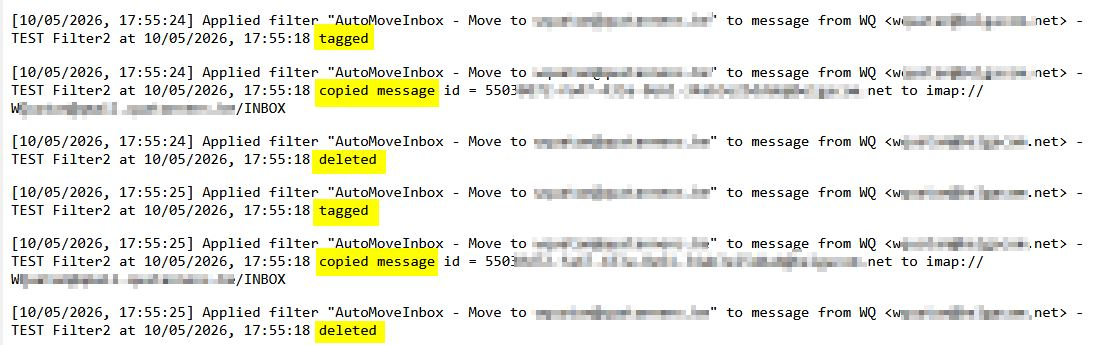
On one of my accounts I have an enabled filter for incoming messages consisting of a Tag + Copy + Delete (see screenshot) When a new message arrives, the filter is executed TWICE (see screenshot of the log) , the copied message arrives TWICE at the destination (once tagged, once NOT tagged). In the deleted folder of the source there is only one message.

What might be gong on ? Why is the filter executed twice ?

PS : I also tried Tag + Move instead of Tag + Copy + Delete
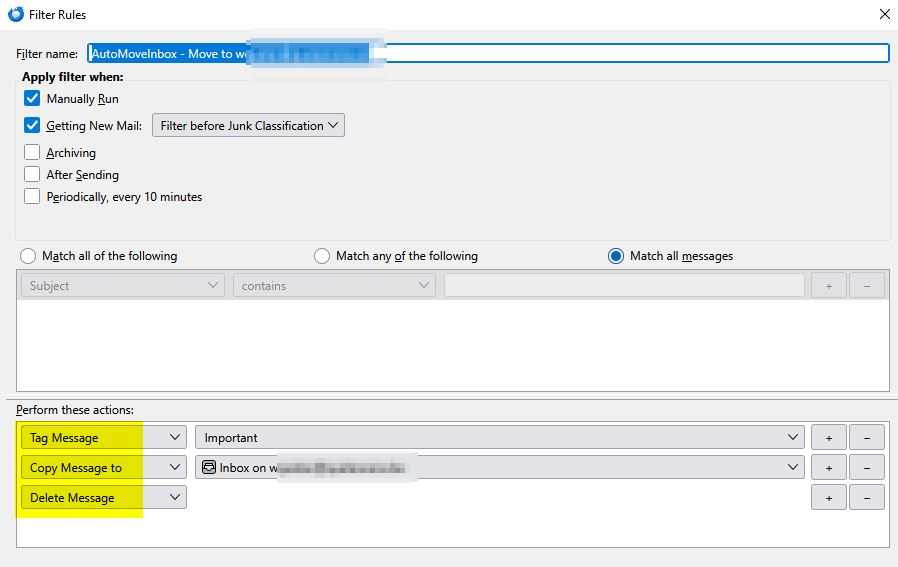
Hi, On one of my accounts I have an enabled filter for incoming messages consisting of a Tag + Copy + Delete (see screenshot) When a new message arrives, the filter is executed TWICE (see screenshot of the log) , the copied message arrives '''TWICE''' at the destination '''(once tagged, once NOT tagged'''). In the deleted folder of the source there is only one message. What might be gong on ? Why is the filter executed twice ? PS : I also tried Tag + Move instead of Tag + Copy + Delete
Nseta ihuenyo ndị agbakwunyere

All Replies (4)

Try adding Stop Filter Execution.

Tried it, exactly the same result.

The filter is executed twice including twice the "Stop Filter Execution" forced as the last action independent where I insert it.

Are these two different accounts? If the same account, the messages appear to be shuffled.

Yes, different accounts Incoming message in Account-A-Inbox with the filter-actions towards Account-B-Inbox

Jụọ ajụjụ

You must log in to your account to reply to posts. Please start a new question, if you do not have an account yet.
