


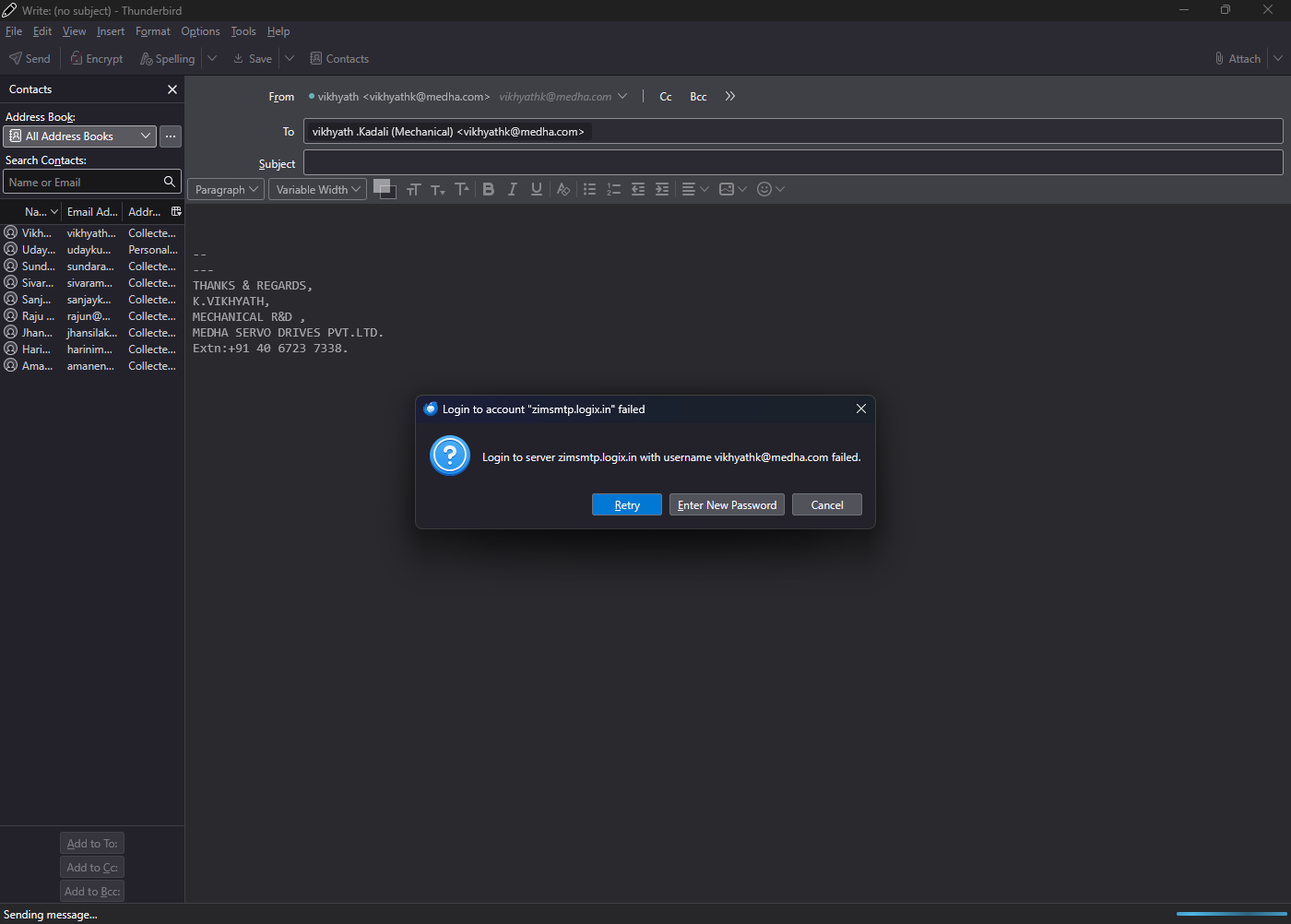
I cannot send or receive emails because the password is incorrect. I changed my password BECAUSE IT IS GOING TO EXPIRE IN 5 DAYS .IT IS SHOWING THAT INCORRECT PASSWORD so why is this happening? IM NOT RECEIVing THE EMAILS SINCE 10 DAYS. . Please advise.

I am totally frustrated with Thunderbird. All I want to do is send and receive email, but I always run into problems. This time I cannot send or receive emails because the password is incorrect. I changed my password BECAUSE IT IS GOING TO EXPIRE IN 5 DAYS AND I TRIED TO LOGIN AND SEND EMAILS BUT IT IS NOT HAPPENING IT IS SHOWING THAT INCORRECT PASSWORD so why is this happening? I removed all OLD passwords FROM PASSWORD MANAGER to my email and Thunderbird still SHOWING INCORRECT PASSWORD AND I M NOT ABLE TO RECEIVE THE EMAILS SINCE 10 DAYS. . Please advise.
All Replies (4)
As a heads up, using capital letters means you intend to shout at whomever reads the question. The people who help on this forum are just other Thunderbird users who offer their time as unpaid volunteers. We are not Mozilla nor Thunderbird employees. I've no idea why you think it's ok to shout at people you do not know when you are asking them to help you. It's not ok and this forum does have etiquette rules. I understand your frustration, it's understandable, but ask you to be polite and offer any information that is asked.
re : I changed my password because it's going to expire in 5 days.
I've not come across anyone who had an actual expiry date on a password, I do hope it was legitimate and not someone trying to scam you to reveal passwords.
I'm assuming it was legit and you logged on to your webmail account via a browser and modified the password in order to comply.
After modifying password, I presume you logged out of that webmail account, waited a few moments before trying to logon again using the new password to ensure it worked.
1. Please confirm you are able to logon to the webmail account via a browser using that new modified password. It's important you can do this because if you cannot then Thunderbird cannot and it needs to get sorted quickly.
Q: Did you manage to logon to webmail account using that new password?
2. Once you can confirm you have access to the webmail account using modified password then you would need to update the stored passwords in Thunderbird.
- Settings > Privacy & Security
- Scroll down to the 'Passwords' section
- click on 'Saved Passwords'
- Click on 'Show Passwords'
If you get a small pop up window by 'Microsoft' asking for a password: When you start computer you enter a User Account password in order to logon to desktop - that is the password you need to enter.
You will have two lines where the 'username' = email address of updated password. One is incoming - POP account has a 'mailbox:// line, IMAP account has a imap:// line and outgoing will have a smtp:// line. Right click each line and select 'Edit Password' completely clear all contents and then carefully type in the new modified password. When you have done both incoming and outgoing smtp passwords, click on 'Close'
Now Exit Thunderbird and wait a few moments for all background updates to files to complete - it should only take a few seconds.
Then restart Thunderbird and it will use the new password you entered.
If this sorted out your problem then please mark this comment as your Chosen Solution.
IM SORRY, I DONT KNOW THAT USING CAPITAL LETTERS MEANS SHOUTING . ACTUALLY SOME KEYS ON MY KEY BOARD ARE NOT WORKING AND I COPIED AND EDITED THE TEXT FROM ANOTHER MAIL . ONCE AGAIN I SINCERELY APOLOGIZE TO YOU AND ALL THE PEOPLE WHO FELT LIKE THAT.
IM NOT ABLE TO LOGON TO THE WEBMAIL THROUGH BROWSER
vihkyathkadali said
IM NOT ABLE TO LOGON TO THE WEBMAIL THROUGH BROWSER
That explains why you cannot access the server via Thunderbird.
Thunderbird is not blocking the access to the server, the server is rejecting your attempt by Thunderbird because Thunderbird is sending the wrong data. You will only know what is the correct password when you know you can use it to access the webmail account.
You said "ACTUALLY SOME KEYS ON MY KEY BOARD ARE NOT WORKING" - maybe this keyboard issue be causing the logon problem? You seem to be stuck on capital letters. On the left side of keyboard, there should be a 'Caps Lock' key - click on it to see if it switches off the capital letter lock. Passwords are usually a mix of upper and lower case and include numbers and maybe a ! mark. But if you have the Caps Lock enabled then you might be typing all the right keys but passwords are case sensitive and it will not work.
First : Get the keyboard working properly. Clean keyboard (not with a liquid), remove dirt from just below keys as they may be sticky. Disable the Caps Lock as it seems stuck on - some computers you just click on the 'Caps Lock' key to switch off if it's switched on - it works like a toggle switch. But some computers may be set up to disable by pressing the 'Shift' key. These links may be helpful to see what is set up on computer:
- https://learn.microsoft.com/en-us/answers/questions/3743963/update-for-w11-on-caps-unlock-with-shift-key
- https://support.lenovo.com/gb/en/solutions/ht501231-press-shift-key-to-turn-off-caps-lock-in-windows-810
- https://learn.microsoft.com/en-nz/answers/questions/3993855/caps-lock-behavior-not-consistent
It may help to test by using another good keyboard.
Second:
When you know keyboard is working - you need to get access to your webmail account because that is the only place where you can create/modify a password.
If keyboard is now working correctly, you may find you can access webmail. B
IF there is still a problem:
On the webmail logon webpage, there should be a text link which says something like 'Forgotten password'. You would need to click on that link and then follow the instructions in order to regain access to the webmail account.
Once you have access, you may need to update/modify your password.
Third: In Thunderbird use instructions I mentioned in previous comment to update the stored password.