Windows 10 reached EOS (end of support) on October 14, 2025. If you are on Windows 10, see this article.

Search Support

Avoid support scams. We will never ask you to call or text a phone number or share personal information. Please report suspicious activity using the “Report Abuse” option.

Learn More

icloud display corruption

I routinely keep a tab open to view my iCloud account (PC running Windows 11 Home).

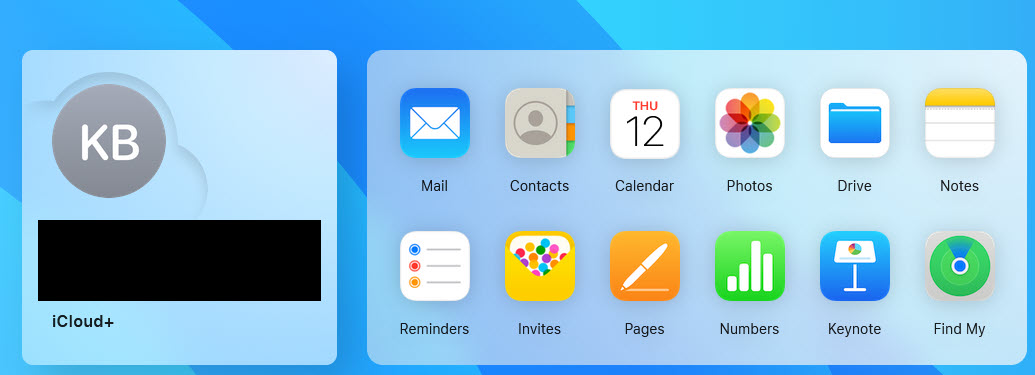
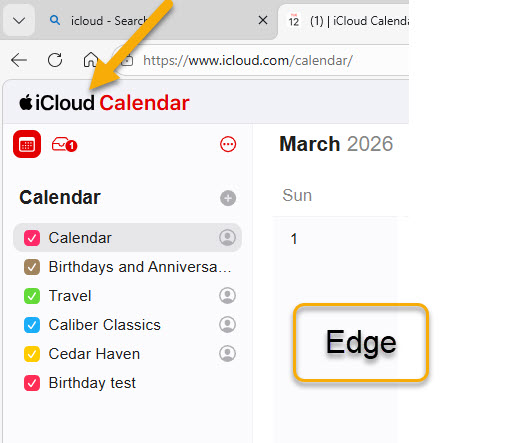
Everything has worked just fine in the past. Here are the basics using Edge... -The home page displays like the first attachment. -Clicking an icon takes me to the calendar page (see the Edge screenshot in the second attachment) -Clicking the word, 'iCloud' (see yellow arrow in second attachment) returns me to the home page.

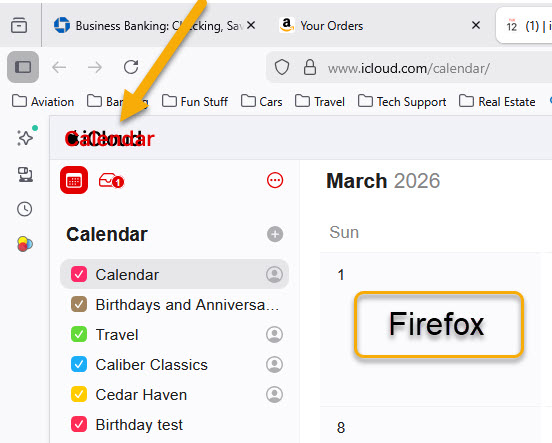
But now, using Firefox, if I click the calendar icon (or any other) the calendar return link and Calendar page title are superimposed over one another and the return link does not work. -Check out the yellow arrow in the third attachment -If I click the iCloud/Calendar mishmash I get nothing. If I click left arrow or Back I get nothing.

Note that this still works fine with Edge but does not work with Firefox. Have tried clearing Firefox cache (no change) but don't know what else to try.

Any ideas?
I routinely keep a tab open to view my iCloud account (PC running Windows 11 Home). Everything has worked just fine in the past. Here are the basics using Edge... -The home page displays like the first attachment. -Clicking an icon takes me to the calendar page (see the Edge screenshot in the second attachment) -Clicking the word, 'iCloud' (see yellow arrow in second attachment) returns me to the home page. But now, using Firefox, if I click the calendar icon (or any other) the calendar return link and Calendar page title are superimposed over one another and the return link does not work. -Check out the yellow arrow in the third attachment -If I click the iCloud/Calendar mishmash I get nothing. If I click left arrow or Back I get nothing. Note that this still works fine with Edge but does not work with Firefox. Have tried clearing Firefox cache (no change) but don't know what else to try. Any ideas?
Nseta ihuenyo ndị agbakwunyere

All Replies (1)

I'm able to replicate the issue on Win7. see screenshot You should open a bug for devs to look at this. https://bugzilla.mozilla.org/home

Jụọ ajụjụ

You must log in to your account to reply to posts. Please start a new question, if you do not have an account yet.