


Missing X in Bookmarks search box FF93

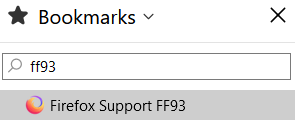
I use the sidebar to see my bookmarks on the left side of the screen. When using the Search bookmarks box there used to be an X on the right side to clear the search setting. That X is now gone which means I now have to close & reopen Bookmarks to clear the box. I believe this issue started with version 93 but I can't say for sure if it worked in version 92.
Asịsa Ahọpụtara
I don't use that search box, but I noticed that the Esc key clear its contents immediately. Can't decide if that is convenient or a way to shoot yourself in the foot accidentally.
All Replies (4)

I am not sure about the X button, but in the meantime you can open/close the sidebar more easily by pressing Ctrl + B.
Thanks. I have an icon on the address line that does that. It's just another one of those little irritants in the later versions.
Asịsa Ahọpụtara
I don't use that search box, but I noticed that the Esc key clear its contents immediately. Can't decide if that is convenient or a way to shoot yourself in the foot accidentally.
Thank for for the easy fix! That's actually faster than clicking on the missing X.