


When I load firefox it looks for a disk in the drive ???

When I load firefox it looks for a disk in the drive. This is difficult to get rid of, and I can't use the program until it disappears.
Semua Balasan (7)
Try Firefox Safe Mode to see if the problem goes away. Safe Mode is a troubleshooting mode, which disables most add-ons.
(If you're not using it, switch to the Default theme.)
- On Windows you can open Firefox 4.0+ in Safe Mode by holding the Shift key when you open the Firefox desktop or Start menu shortcut.
- On Mac you can open Firefox 4.0+ in Safe Mode by holding the option key while starting Firefox.
- On Linux you can open Firefox 4.0+ in Safe Mode by quitting Firefox and then going to your Terminal and running: firefox -safe-mode (you may need to specify the Firefox installation path e.g. /usr/lib/firefox)
- Or open the Help menu and click on the Restart with Add-ons Disabled... menu item while Firefox is running.
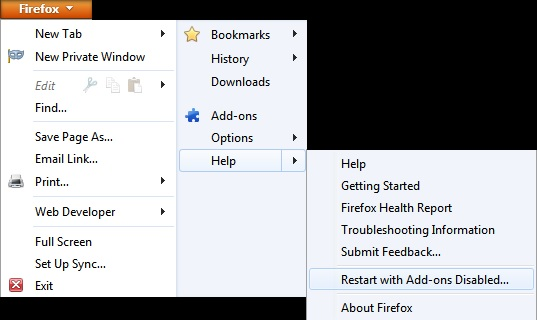
Once you get the pop-up, just select "'Start in Safe Mode"
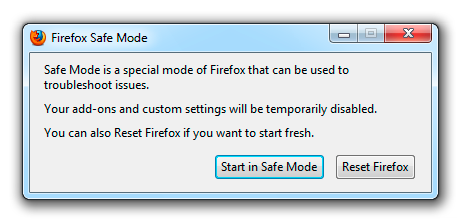
If the issue is not present in Firefox Safe Mode, your problem is probably caused by an extension, and you need to figure out which one. Please follow the Troubleshoot extensions, themes and hardware acceleration issues to solve common Firefox problems article for that.
To exit the Firefox Safe Mode, just close Firefox and wait a few seconds before opening Firefox for normal use again.
When you figure out what's causing your issues, please let us know. It might help other users who have the same problem.
Thank you.
Did you ever saved a download to a disk in that drive or otherwise accessed a file on that drive in Firefox?
Not to my knowledge. This is a new machine and I have used the drive only once since I got it, and that was not to write to it.
Did you try Firefox Safe Mode?
You can try to create a new profile as a test to check if your current profile is causing the problems.
See "Creating a profile":
- https://support.mozilla.org/kb/profile-manager-create-and-remove-firefox-profiles
- http://kb.mozillazine.org/Standard_diagnostic_-_Firefox#Profile_issues
If the new profile works then you can transfer some files from an existing profile to the new profile, but be cautious not to copy corrupted files to avoid carrying over the problem.
If you open the Library dialog to history using either
- History > Show All History
- Ctrl+Shift+h
and in the search box try file://
Does anything come up that would have been on an external drive?
Thank you When I try this the screen is blank. I have tried resetting firefox back to factory settings. No Joy
Did you install Firefox from removable media? Even then, it shouldn't make a difference.
Firefox's program directory (under C:\Program Files (x86)\) contains folders that third party software can use to add plugins and extensions that operate even after a reset or in a new profile. If you check your Add-ons page, do you want to try disabling everything except Shockwave Flash and see whether that makes a difference on the next startup?
orange Firefox button (or Tools menu) > Add-ons > Plugins category
orange Firefox button (or Tools menu) > Add-ons > Extensions category