


Anyone else seeing problems with mouse interfering with awesome bar?

I think I've found a bug that has crept in, I've only noticed it recently, perhaps only since 13 but maybe 11 or 12, not sure.
I am a power user and use keyboard and awesomebar features heavily. This is a common sequence:
1. Ctrl L to focus in address bar 2. Type some chars, often the keyword associated with a bookmark. 3. Use down arrow to get entry I want usually it is 1st entry 4. Hit Enter
The problem now is if the mouse pointer happens to be in the area beneath the address bar, around where the 1st or 2nd entry in the dropdown list that appears when I type a few characters, then the first time I hit down arrow the entries at or above the mouse are skipped, and the first entry below where the mouse is is selected instead. Thus instead of getting the first entry (usually the one I want) I get the 3rd or 4th - very confusing!
Semua Balasan (6)
Hi,
Please also check if this happens in Safe Mode. Safe mode disables the installed Extensions, and themes (Appearance) in Tools (Alt + T) > Add-ons. Hardware acceleration is also temporarily disabled - the manual setting is Tools > Options > Advanced > General > Use hardware acceleration when available. All these settings/options/add-ons can also be individually or collectively disabled/enabled/changed in Firefox normal mode to check if an extension, theme, option or hardware acceleration is causing issues. Disabling/enabling hardware acceleration, and some types of add-ons in normal mode may require a Firefox restart.
Sorry I forgot to mention that I did try it in Safe Mode, still happens.
I took a screen shot of the situation. I positioned my mouse around where the 2nd dropdown entry would be, typed Ctrl+L and then "mdn" since I knew I had a lot of history entries for that, then hit down arrow. Instead of selecting the first entry for JavaScript, it jumped to the 3rd for Ajax.

(screen grabber doesn't capture mouse pointer, sorry)
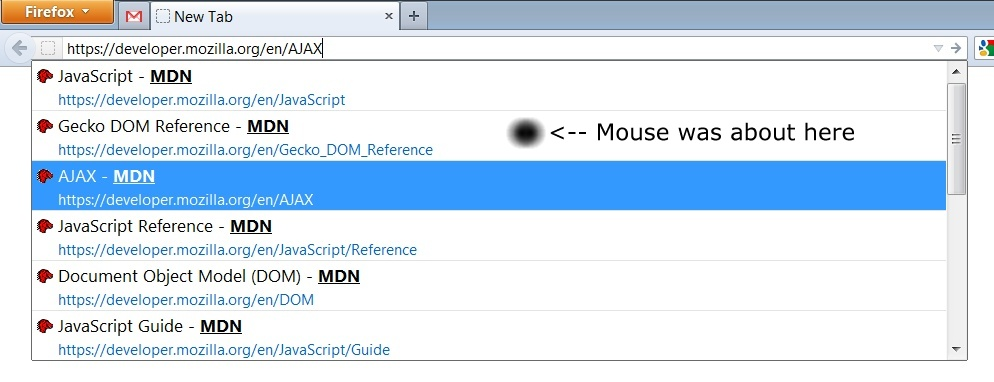
Now I got it. Same thing happening here. I'm not sure if it's a new development. It could be because moving the mouse captures the mouse event and the next keyboard event naturally follows that. This doesn't seem to happen if the mouse pointer is already placed there before hitting Ctrl + L. Please note that there could be a better explanation.
I am not moving the mouse when I am typing the Ctrl-L or mdn or arrow, I have an integrated trackball keyboard so cannot do both at same time.
Will you be filing a bug report or do I do that? If you do please reply with bug# so I can track it. Thanks!
Diperbarui oleh smjames pada
The bug report would be really useful if you could file it as you would be able to better explain the situation in addition to providing the hardware/software configuration. You can also try to capture the entire event using Problem Steps Recorder and add as attachment.