


Not saving password even though no exceptions and site is not restricted

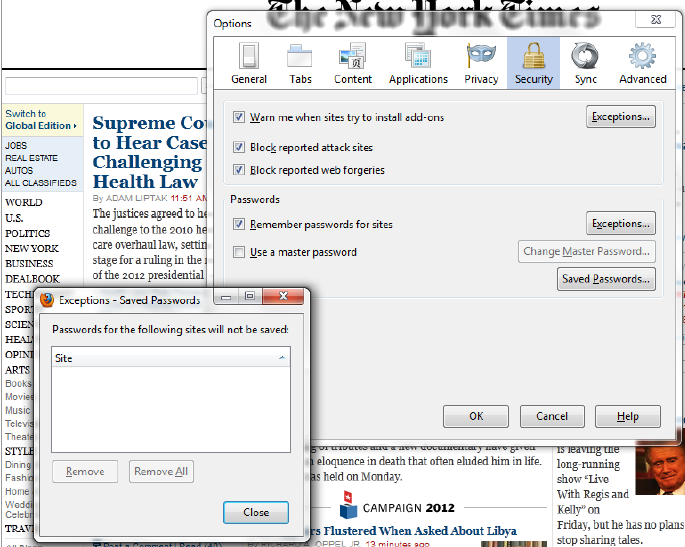
I used to have my password for AA.com saved. I change my password on aa.com and when firefox asked if I wanted to save the new one, I accidentally clicked never remember for this site. Realizing my error, I removed all exceptions to password saving. I still cannot save my password for aa.com. It works for all other sites and it works on other computers for aa.com. Just not on this computer.
Solusi Terpilih
The AAdvantage Number field field on the login page is using autocomplete=off to prevent Firefox from saving the name and password.
You can remove autocomplete=off with a bookmarklet to make Firefox save the name and password.
- Saved Password Editor: https://addons.mozilla.org/firefox/addon/saved-password-editor/
Semua Balasan (5)
If you clicked "Never" then you have created an exception that you need to remove. Remove site(s) from the Exceptions:
- Tools > Options > Security: Passwords: Exceptions
You can manage all permissions on the about:permissions page via the location bar.
Thanks, but I had already removed all exceptions. Right now there are no exceptions to saving passwords.
Solusi Terpilih
The AAdvantage Number field field on the login page is using autocomplete=off to prevent Firefox from saving the name and password.
You can remove autocomplete=off with a bookmarklet to make Firefox save the name and password.
- Saved Password Editor: https://addons.mozilla.org/firefox/addon/saved-password-editor/
Awesome! Thank you. That worked. I am a little confused why I only have to do this on this one computer and not on my travel computer or my touch pad, but hey, this worked and I am very thankful! Have a great week.
You're welcome