


Windows 10 reached EOS (end of support) on October 14, 2025. If you are on Windows 10, see this article.

Cari Bantuan

Avoid support scams. We will never ask you to call or text a phone number or share personal information. Please report suspicious activity using the “Report Abuse” option.

Pelajari Lebih Lanjut
Solved

A vertical blue bar has appeared between folder icon and folder name

work37

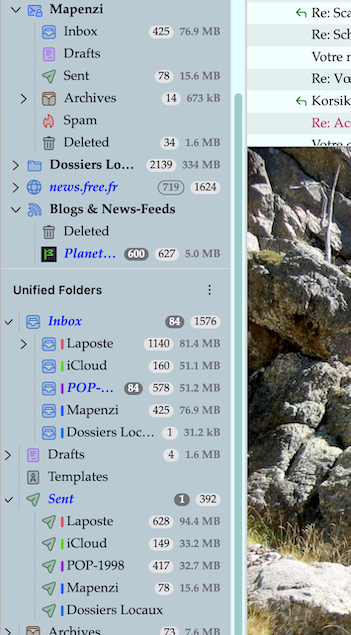
A vertical blue line/bar has appeared between the folder icon and the folder name. I can change the icon colour in properties for a folder but the blue bar stays blue. It is blue regardless of the state of messages in the folder (whether read or unread). Is it possibly related to the bug where Thunderbird tries to update every time I open T? But help says T is up to date. The blue line does not appear on my wife's Thunderbird running the same software version under a different profile. It is very annoying not knowing why it is there and what it means. Thanks

A vertical blue line/bar has appeared between the folder icon and the folder name. I can change the icon colour in properties for a folder but the blue bar stays blue. It is blue regardless of the state of messages in the folder (whether read or unread). Is it possibly related to the bug where Thunderbird tries to update every time I open T? But help says T is up to date. The blue line does not appear on my wife's Thunderbird running the same software version under a different profile. It is very annoying not knowing why it is there and what it means. Thanks

Semua Balasan (2)

Solusi Terpilih

Blue is the standard color of an account if you don't customize it in account settings. The colored bars are only displayed in the folder pane when you use the "All Folders" view (see image)
Many thanks. That has solved it.

Ajukan pertanyaan

Anda harus masuk ke akun Anda untuk membalas kiriman ini. Sila mulai pertanyaan baru, jika Anda belum memiliki akun.