


Printing emails without headers, only email content.

I only want to print the content of the email without the header. Currently, everything is printed, including the headers. This is tedious to read. Two pages of header information and only at the end is the actual content of the email. Where and how can I change this setting?
Solusi terpilih
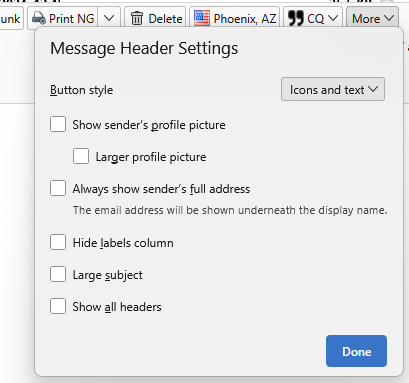
It's in the screenshot itself. Click to the buttons above a selected message and the rightmost button is 'more.' Click that and then click 'customize.'
Baca jawaban ini dalam konteks 👍 1Semua Balasan (4)
Change the setting for show header all to not include them all toi that shown.
Thank you very much for pointing that out. I cannot find this input window. Please provide more detailed information on where I can find it.
My Thunderbird version is 146.0.1
Solusi Terpilih
It's in the screenshot itself. Click to the buttons above a selected message and the rightmost button is 'more.' Click that and then click 'customize.'
