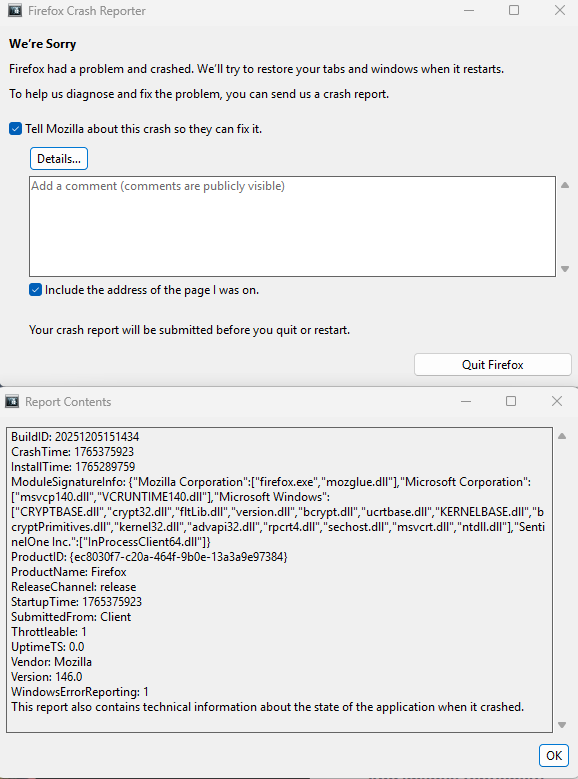
Constant Crash Reporter - Cannot Load FF

Firefox is no longer working on my new Surface Pro. I tried to open a new session and received the following error: BuildID: 20251205151434 CrashTime: 1765375923 InstallTime: 1765289759 ModuleSignatureInfo: {"Mozilla Corporation":["firefox.exe","mozglue.dll"],"Microsoft Corporation":["msvcp140.dll","VCRUNTIME140.dll"],"Microsoft Windows":["CRYPTBASE.dll","crypt32.dll","fltLib.dll","version.dll","bcrypt.dll","ucrtbase.dll","KERNELBASE.dll","bcryptPrimitives.dll","kernel32.dll","advapi32.dll","rpcrt4.dll","sechost.dll","msvcrt.dll","ntdll.dll"],"SentinelOne Inc.":["InProcessClient64.dll"]} ProductID: {ec8030f7-c20a-464f-9b0e-13a3a9e97384} ProductName: Firefox ReleaseChannel: release StartupTime: 1765375923 SubmittedFrom: Client Throttleable: 1 UptimeTS: 0.0 Vendor: Mozilla Version: 146.0 WindowsErrorReporting: 1 This report also contains technical information about the state of the application when it crashed.
I have uninstalled and re-installed several times and even the downloader throws this error once it finishes. I simply can no longer use the browser. This is a huge inconvenience since I saved so many links for my work. Please help.