


Windows 10 reached EOS (end of support) on October 14, 2025. If you are on Windows 10, see this article.

Cari Bantuan

Avoid support scams. We will never ask you to call or text a phone number or share personal information. Please report suspicious activity using the “Report Abuse” option.

Pelajari Lebih Lanjut

Thunderbird creates spam folder when I already have a junk folder (bug1985372)

  • 1 balas
  • 4 memiliki masalah ini
  • 214 kunjungan
  • Balasan terakhir oleh Wayne Mery
  • Diarsipkan

I use Thunderbird desktop to access IMAP email from my hosting provider. My hosting provider includes a junk email folder named "Junk" with the path "...hosting.com/INBOX/Junk. I cannot delete this folder.

Whenever I run Thunderbird, it creates a second folder named "Junk" with the path "...hosting.com/INBOX/spam. If I right-click on this folder and delete it, it is re-created the next time I start Thunderbird. I have gone into "Junk Settings" unchecked the "Move new junk message to..." checkbox thinking that this is causing Thunderbird to mistakenly create an extra junk/spam folder but it continues to create that extra junk folder.

How do I stop this from happening? I should only require one junk/spam folder.
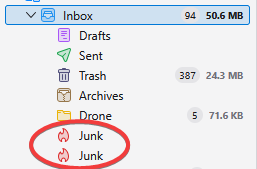
I use Thunderbird desktop to access IMAP email from my hosting provider. My hosting provider includes a junk email folder named "Junk" with the path "...hosting.com/INBOX/Junk. I cannot delete this folder. Whenever I run Thunderbird, it creates a second folder named "Junk" with the path "...hosting.com/INBOX/spam. If I right-click on this folder and delete it, it is re-created the next time I start Thunderbird. I have gone into "Junk Settings" unchecked the "Move new junk message to..." checkbox thinking that this is causing Thunderbird to mistakenly create an extra junk/spam folder but it continues to create that extra junk folder. How do I stop this from happening? I should only require one junk/spam folder.
Lampiran tangkapan layar

Diperbarui oleh Wayne Mery pada

Semua Balasan (1)

Please create a bug report at https://bugzilla.mozilla.org/enter_bug.cgi?product=thunderbird with details including your provider/domain name.