

Utas ini telah diarsipkan.
Silakan membuat pertanyaan baru jika Anda membutuhkan bantuan.

Terselesaikan
Diarsipkan
Need Speech to Text Capability in Firefox for iOS
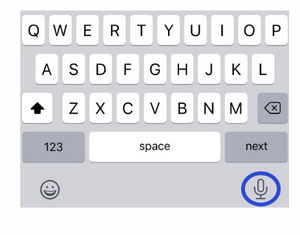
Firefox is my default browser on iPhone 11 Pro. I use an education app that has a Speech to Text feature to dictate student observations. In a Safari browser this feature is readily accessed by a microphone symbol on the keyboard that comes up in a text window. In Firefox I cannot access the microphone for speech to text. I don't want to go back to Safari as my default browser. Is there a workaround? The image is of the Safari screen in this app. Can Firefox enable a similar access using an icon for the microphone?
Firefox is my default browser on iPhone 11 Pro. I use an education app that has a Speech to Text feature to dictate student observations. In a Safari browser this feature is readily accessed by a microphone symbol on the keyboard that comes up in a text window. In Firefox I cannot access the microphone for speech to text. I don't want to go back to Safari as my default browser. Is there a workaround? The image is of the Safari screen in this app. Can Firefox enable a similar access using an icon for the microphone?
Semua Balasan (1)
Solusi Terpilih
Check keyboard settings in Settings app. Speech to text option should be beside space button.