


I keep getting "This connection is untrusted" in all sites when i use Firefox 36.0.1 on windows 8 laptop. How can i overcome this.

I keep getting "This connection is untrusted" in all sites when i use Firefox 36.0.1 on windows 8 laptop. How can i overcome this.
Solusi terpilih
hi vijaysampath, first please make sure that the date, time & timezone are set correctly on your system. if this doesn't solve the issue (or it is already set properly), a possible solution depends on different factors:
- what is the error code shown under technical details on the error page?
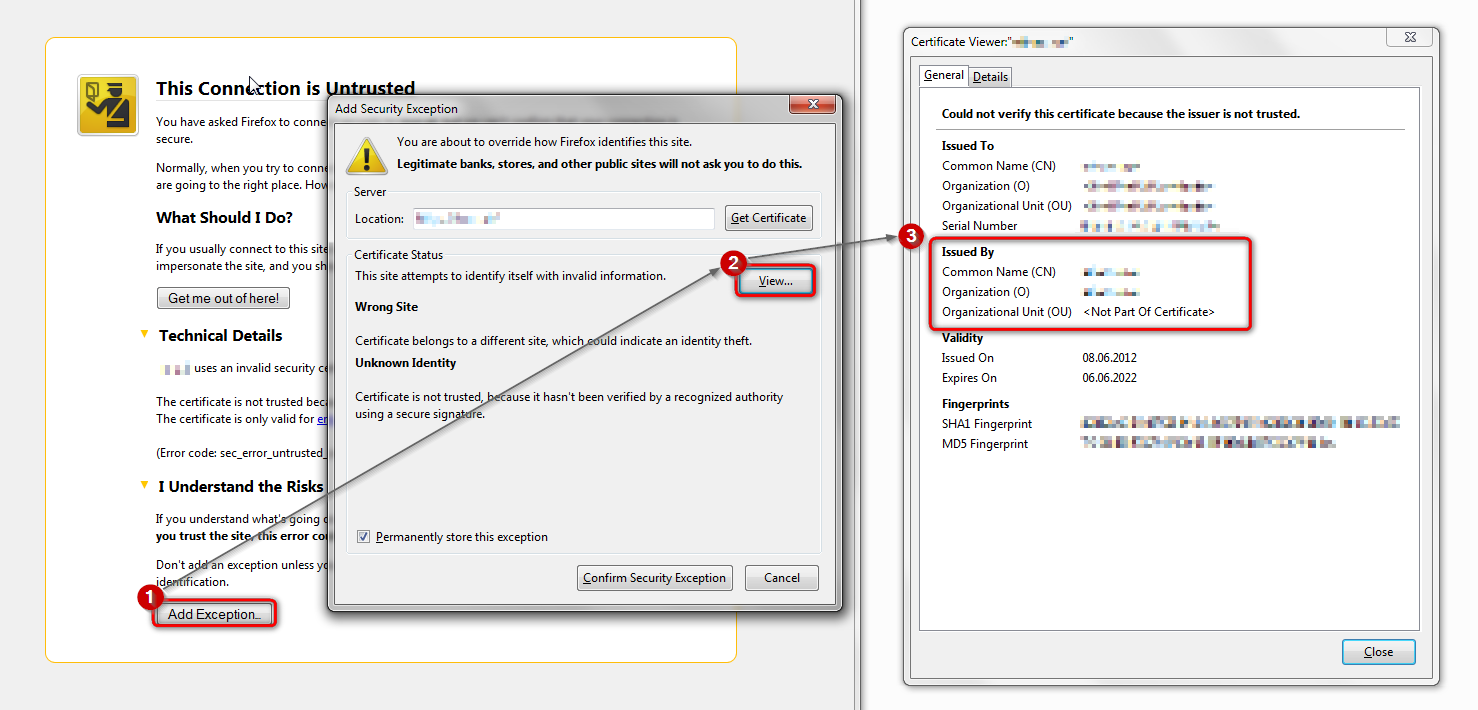
in case the error code equals sec_error_unknown_issuer, please attempt to add an exception on the bottom of the error page in order to inspect the certificate like it is shown on the screenshot attached:
- which issuer information does the certificate contain?
please report back with those two pieces of information. thank you!
Baca jawaban ini dalam konteks 👍 1Semua Balasan (2)
Solusi Terpilih
hi vijaysampath, first please make sure that the date, time & timezone are set correctly on your system. if this doesn't solve the issue (or it is already set properly), a possible solution depends on different factors:
- what is the error code shown under technical details on the error page?
in case the error code equals sec_error_unknown_issuer, please attempt to add an exception on the bottom of the error page in order to inspect the certificate like it is shown on the screenshot attached:
- which issuer information does the certificate contain?
please report back with those two pieces of information. thank you!
Dear Philipp, Thanks for your response. The data and time zones were correct and we have solved the problem.
The issue was we had installed McAfee antivirus and that was blocking this. Once we removed this, Firefox started behaving properly.
Maybe this is something to look into.
Thanks again,
Vijay Sampath