


Firefox 20.0.1 crashes when accessing a MyHeritage web page (possibly involves Shockwave)

I have a problem with Firefox 20.0.1 under Windows 7 with Shockwave flash plug-in 11.7.700.169. When I access a web site "MyHeritage" with a page that displays my family tree, I repeatedly get a message "Video driver stopped working - NVIDIA driver ... has successfully recovered". If I disable Shockwave, Firefox / video driver will not crash. BTW - running Firefox in safe mode (add-ons disabled) stopped my NVIDIA driver from crashing. I had a second problem when playing videos (eg. YouTube) where Firefox crashed but updating some of my plug-ins fixed that particular problem. Any suggestions?
Wubrane rozrisanje
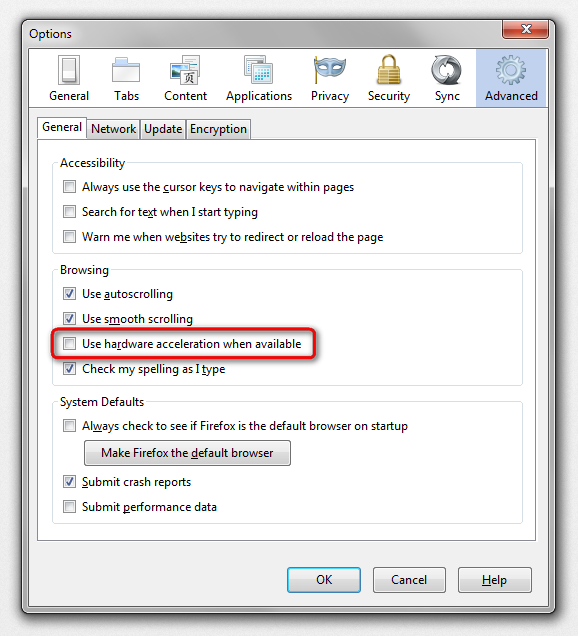
hello walter, when the crash didn't happen in safe mode than it is a problem likely related to hardware acceleration. please try updating your graphics driver, or in case this doesn't solve the issue or there is no new version available at the moment, disable hardware acceleration in firefox > options > advanced > general.
Tutu wotmołwu w konteksće čitać 👍 1Wšě wotmołwy (2)
Wubrane rozrisanje
hello walter, when the crash didn't happen in safe mode than it is a problem likely related to hardware acceleration. please try updating your graphics driver, or in case this doesn't solve the issue or there is no new version available at the moment, disable hardware acceleration in firefox > options > advanced > general.
Thanks for that suggestion - I have tried a number of things on the offending web pages and cannot crash Firefox after dropping hardware acceleration