Thunderbird version 160.0 64 bit

Thunderbird version 160.0 64 bit will not create a new folder.
Go through the steps like I have for years to create a folder and it goes through all the menus with no error but when I check my folders it is not created.
Very weird software.
Wšě wotmołwy (10)

I cannot reproduce this. Running Thunderbird 160 on Windows 10, I can right-click on any folder in the Folders List, choose "New Folder" or "New Subfolder" and it's created just as always.
- What is your operating system?
- What happens if you restart Thunderbird in Troubleshoot Mode (see <Help | Troubleshoot Mode>) and try again?
Win 11 for the last 1.5 years
Restart does no good.
All started recently.
Never had these problems with this or earlier versions before for years.
"Restart" is not the same thing as "restart in Troubleshoot Mode."
What happens when you restart Thunderbird in Troubleshoot Mode (see <Help | Troubleshoot Mode>) and try again?
Are you sure the folder is there but not where you expect it? It may not be in alphanumeric order.
If I restart in troubleshoot mode and create a folder it goes through the process but still does NOT create the new folder.
Very strange software behavior.
If I create a test folder it in Outlook it works fine but does NOT show that new folder in Thunderbird.
Also notice that Thunderbird will not open as it locks up until I go to Task Manager in windows and highlight Thunderbird at which time it quickly goes away without ending Thunderbird in task manager and then I can open Thunderbird.
I figured out if I change the security connection setting to SSL/TLS then I can create a folder.
Was changed somehow to STARTTLS which would not allow a new folder to be created.
Interesting! So you're good now?
If you had the wrong encryption setting, I'm surprised that you could receive or send mail at all. Usually if those settings are wrong you can't reach the server and you'd get timeout errors.
- Who is the email provider?
- Is this an IMAP or POP3 account?
- When you create a folder using the provider's webmail interface, does it show up in Thunderbird?
- When you try to create a folder using Thunderbird, does it show up in webmail?
- Are you able to successfully send and receive email?
If this is an IMAP account, try right-clicking on the account name in the Folder's List and choosing "Subscribe". You should see a list of all available folders with check boxes next to each. If they don't all show, click the "Refresh" button.
Interesting to note that when the setting was incorrect Thunderbird did not indicate any error like many other programs would.
Thunderbird IMAP
It shows up after fixing the setting in Thunderbird but not before it was corrected.
Yes, it works now.
Thank you Lin!
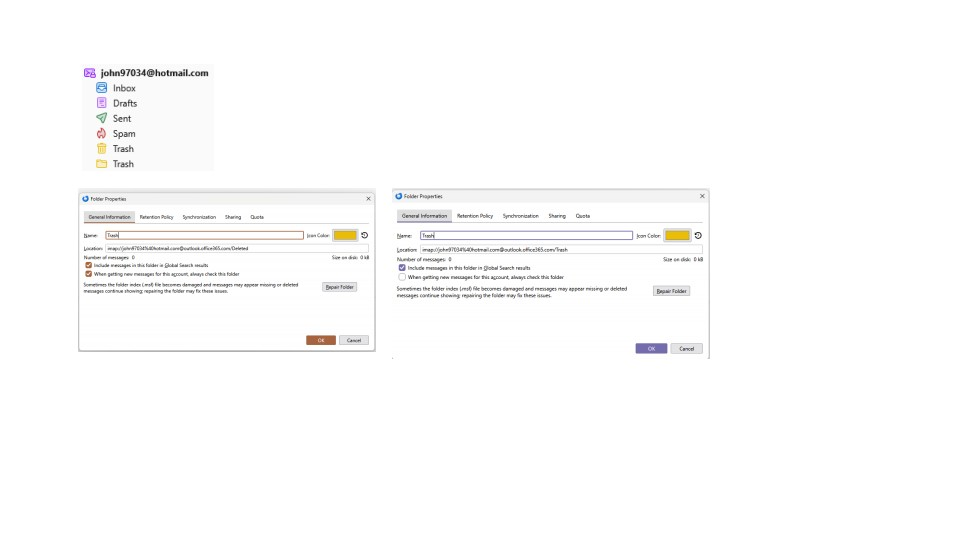
Now, I just wish that Thunderbird would allow a trash folder to be renamed.
When users like me use both Outlook and Thunderbird they end up with 2 trash folders because Thunderbird automatically renames the deleted folder form Outlook also as trash.