


moved email to a folder and it is not there.

I moved some emails to a folder and they are not there. Tried to move last email to folder and it jumps back to my inbox. Also how do I access help in thunderbird?
Wšě wotmołwy (3)
Found access for help by right clicking address book to open menu bar;which is strange.
Try looking on the application menu ☰ for help.
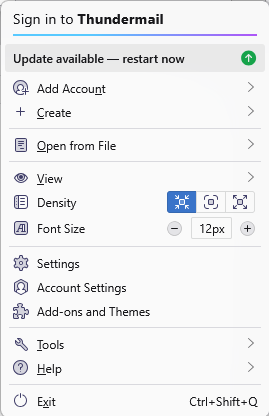
However back to you issue.
You moved some emails. What emails on what provider in what folder.
For instance IMAP is syncronised to the server. Yahoo once they decide an email is spam they will keep moving it there despite what you choose.
IMAP works by asking the server to remove an email from the folder and add it to another. If this process breaks down for any reason then the move either does not occur or the email involved simply disappears. Either is possible. which is why I recommend copying and then deleting once the move is verified as complete.
Common causes of breakdown as connectivity issues from interment or failing internet connections, saturated bandwidth resulting in the communication timing out. Antivirus scanning can also see moves timeout. So you have what is a relatively common problem with moving IMAP mails between folders that rarely has it's roots in the mail program.
Will try to do copy then delete instead of dragging to. One did eventually show up later.