


reloaded Thuderbird but address book .sqlite file not reloading

Thunderbird locked up. Followed forum advice to reload Thunderbird. Identified legacy abook.sqlite and history.sqlite files but these will not import to reloaded Thunderbird. Confirmed these files are not read only. Any advice much appreciated..
Wšě wotmołwy (9)
The simple way that I suggest is to exit thunderbird, access the profile within windows file explorer and paste the desired folders in profile, overlaying the existing ones, and then restart thunderbird.
David thanks. I tried a computer shutdown and restart in case this worked, but no change. In windows I can see abook.sqlite which I assume is the original address book, AND abook-1.sqlie which I assume is the new one. BOTH are 256KB. With them both being the same size I look at the date and the -1 file is a day later than the other. You advise to copy the earlier into the later? Please confirm. Many thanks, Ian.
Just replace the abook.sqlite and history.sqlite. Thunderbird creates those others.
David, I'm struggling here. I tried the copy and paste but there is no paste option, on the profile folder file. Also how can I confirm, that the file I see in windows file manager, is the data I'm looking for? Ian.
Okay, fair question. To verify that you are looking at the active profile, do this:
- click help>troubleshootinginformation
- scroll to 'profile folder' in left side of screen and click 'open folder'
- you are now in the active profile and should see an abook.sqlite file. EXIT thunderbird
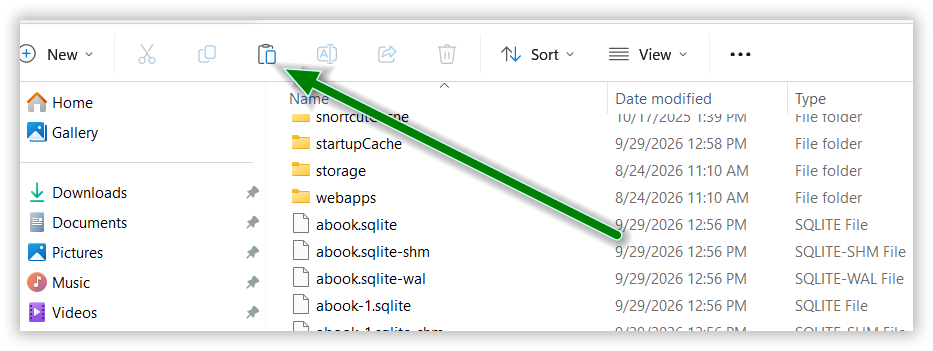
- copy your preferred abook.sqlite file and paste it over the existing file. The paste option is part of windows file explorer. Once you copy the abook.sqlite file, the 'paste' button is highlighted. just press it and it will store whatever has been copied which, in your case, is the abook.sqlite file. See attached screenshot
David, Many thanks, got it - and executed as directed, but not worked. This makes me think that what I think is the heritage file, i.e. the file that historically contained my email addresses is not the right file. I'm stumped. I'm not going to be able to follow this thread for 48 hours due to other commitments. Many thanks for your help. Ian.
What is the heritage file?
Hi David sorry. What I mean by heritage is the original file that contained the email addresses before I deleted my initial version of Thunderbird. Where will I find it? Obviously what I have is not the original file with the emails. Ian
Well, the addressbook of contacts was abook.mab and history.mab until ver 78. From there forward it was abook.sqlite and history.sqlite. To clarify, the files I've mentioned contain just email addresses, not messages. If, when you deleted thunderbird, you also deleted the appdata\roaming\thunderbird folder, then they are gone.