


E-Mail Programm meldet alle Passwörter wären falsch

Guten Tag
Das E-Mail-Programm meldet immer „Passwort falsch“ oder GMX verweigert den Zugang? Komisch ist nur, dass es nur mit ihrem E-Mail-Programm so ist. Das Programm bekommt keinen Zugang, obwohl das Passwort ok ist. Alle Programme funktionieren, nur Ihres nicht. Auch eine Neuinstallation hat nicht geholfen. Seit heute kann ich keine E-Mail bei allen Konten mehr abrufen, da bei allen Konten die Passwörter falsch sein sollen?
Kai Ockenfuss
Wšě wotmołwy (11)
Wubrane rozrisanje
First, check your gmx.com account settings to verify that you authorized access from third-party email client to use IMAP. that is a prerequisite. If that doesn't resolve the issue, then please post screenshots of your account settings. Thank you.
The setting to use third-party email providers is enabled. But that hasn't helped at all. It's not just your program that isn't working it's not working with any email account. I have three set up, and all three have been down since today. No matter what settings I try, I always get the message “Incorrect password” or “Incorrect email address.” Every other program works fine only this one has been having issues since today! Even reinstalling it didn’t fix the problem. The issue is still there!
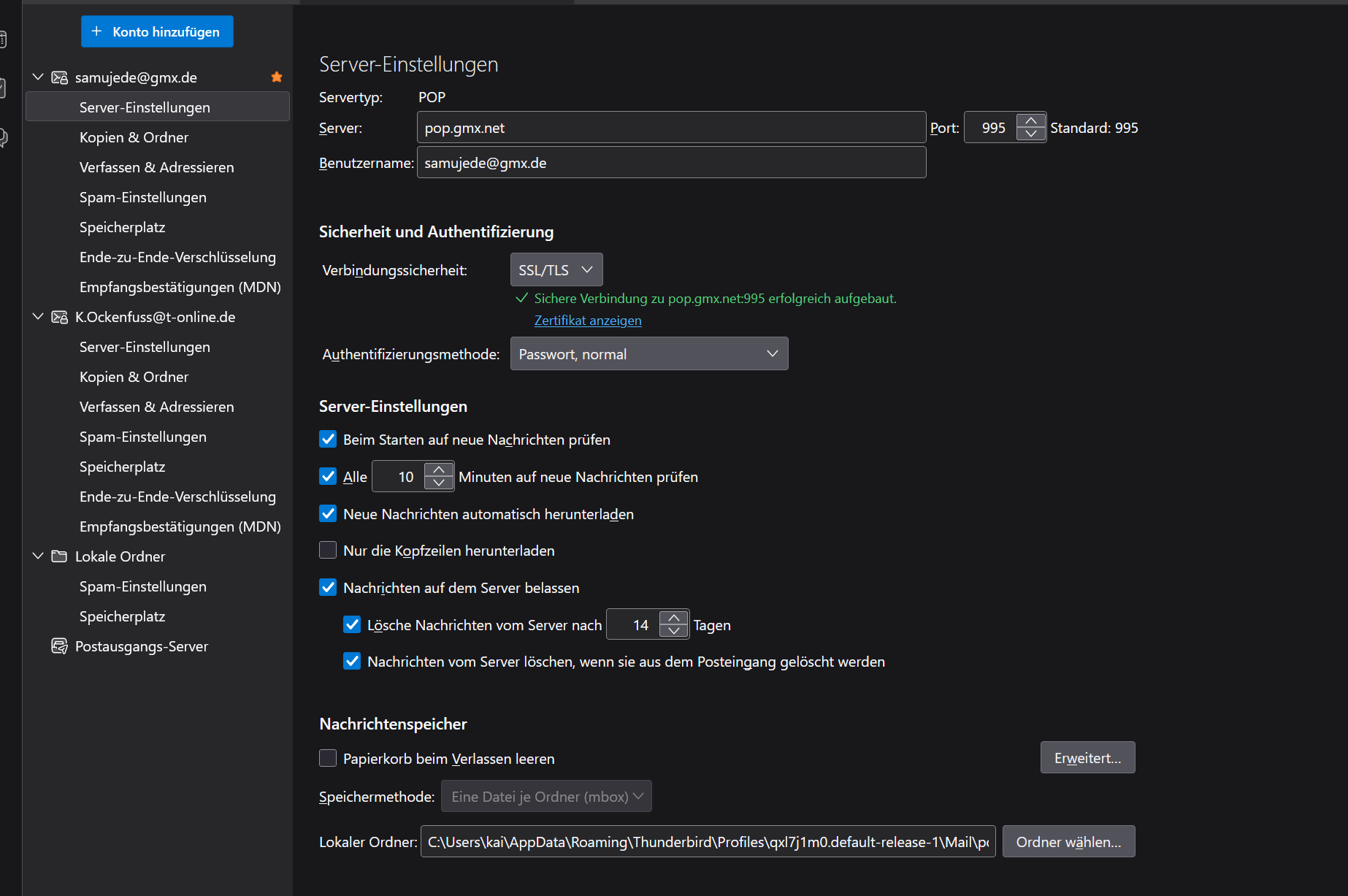
change authentication to OAUTH2
Hmm, sorry, but what is 0AUTH2? Where can I set that? As I said, I'm from Germany, so my program runs in German, not in English.
Okay, but that doesn't answer my question! OAuth2. My question was why, starting today, the program keeps saying “Password incorrect” even though it's the right one! Or are you trying to tell me that the program only works that way now?
Many email providers are tightening their security and moving to OAUTH2. That's the best I can state. OAUTH2 uses a different protocol for managing passwords. This is not a Thunderbird decision; it's made by the various email providers and thunderbird tries to keep up.
Well, I guess that'll cost extra—let's just note that first. And where do you set that up? And why don't you get a notification saying you HAVE to change it!
First, you're becoming rather offensive. I have tried to assist, yet you seem to feel it is your role to challenge me on all of this. thunderbird is not required to tell people how to set their accounts up. To a great degree, it is the responsibility of the user. Thunderbird does attempt to keep a courtesy database of popular email providers to assist users. I let thunderbird today, just as a test, set up a gmx account for me and it included the OAUTH2 setting. You seem focused on WHY someone didn't tell you everything. But life isn't like that. I have provided you with what you need to know.
Well, it’s a problem with my English I had asked where you can get this type of thing. And I realize that the program isn’t to blame for that. I was just surprised that GMX hasn’t said anything about it this is the first time I’ve heard them mention this kind of OAuth2. When I asked the first question, I also asked GMX. They were the first ones to bring it up. I found that strange GMX didn’t say anything about it. Okay, so where do I get this OAuth2 now? I guess I’ll have to set it up myself.
Thank you very much, but GMX.de doesn't use OAuth2. So that doesn't help me, and there's no way to configure it in the program either... It simply isn't displayed.