


Duplicate folders cannot be deleted

I installed Thunderbird on my new laptop, then imported the profile from my old laptop
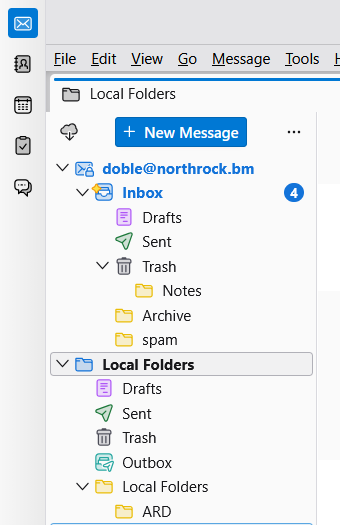
The main screen has, under "Inbox", folders for Drafts, Sent, Trash, Archive and Spam, which are being used by the program
Folders for Drafts, Sent and Trash also appear under "Local Folders" (along with Outbox) and these aren't being used by the program.
How do I get rid of these duplicate folders? "Spam" had a delete option, so that was easy, but the others don't.
I tried the two suggestions for a previous "Duplicates" question but they didn't resolve things.
Thank you
Wšě wotmołwy (4)
Wubrane rozrisanje
If this problem did not exist on old computer, then you may want to redo this. I assume both computers run the same version of thunderbird.

Redo what? I have a duplicate spam folder. Other computers are not a factor. I simply want to delete one of the duplicate spam folders.

I found this on another site:
To use the original server folder names set preference mail.useLocalizedFolderNames to false. (That can be done by clicking settings>general and clicking the 'config editor' button in lower right.
Special folders can no longer be renamed or deleted. In case of doubled-up folders, check the account configuration to see where Draft, Spam, etc. folders are referenced and make sure the desired folder is used. In cases which resist, the add-on FolderFlags can be used to clear folder flags and make folders deleteable.
Let me know if that works.
I have got rid of most of them by just deleting the relevant folders and .msf files from within the profile - Mail - Local Folders
I have left Trash and Outbox in case they are needed by the system, but deleting the others has freed up enough real estate to show all of my folders on screen